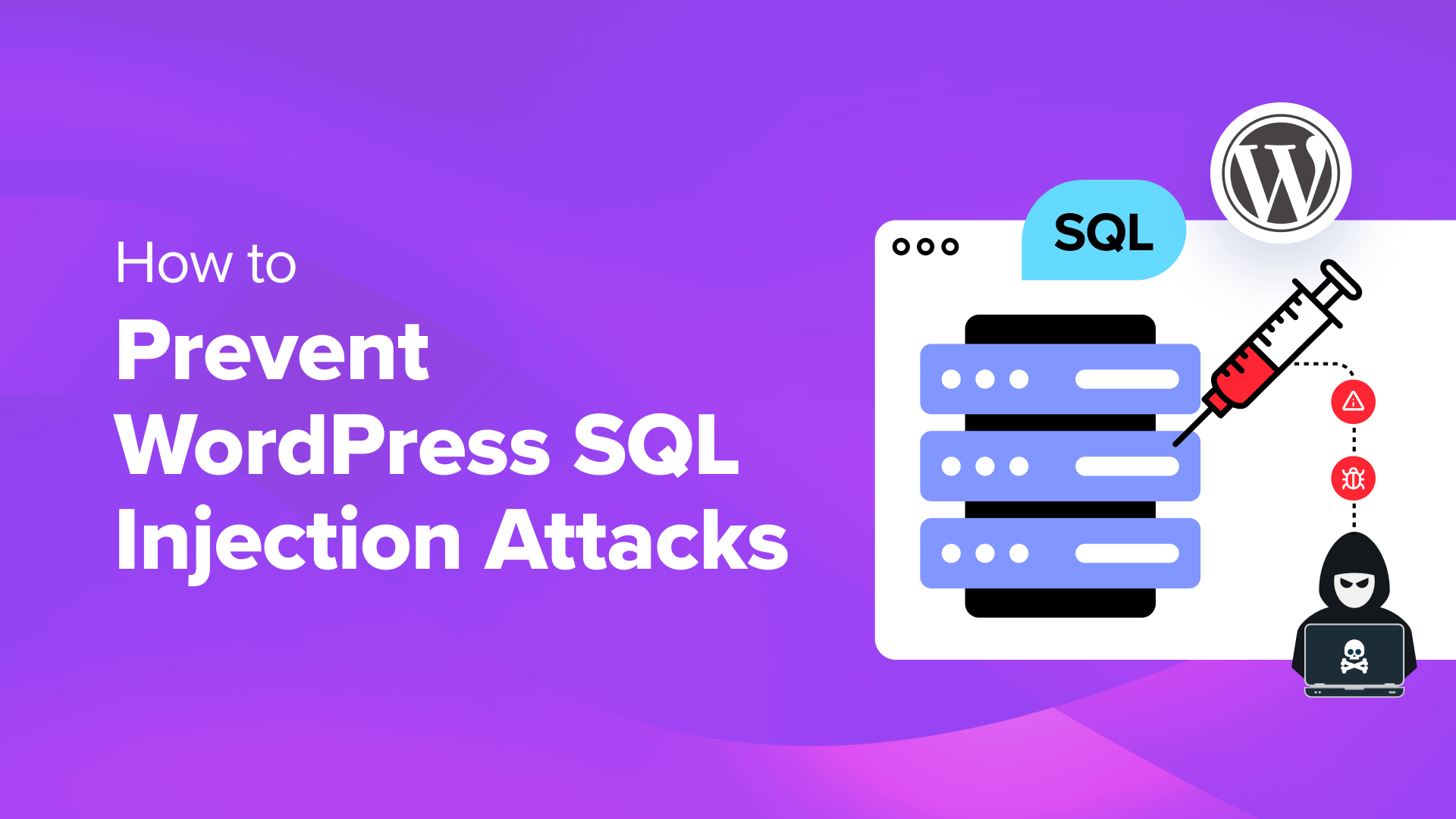
7 Essential Strategies to Protect Your WordPress Site from SQL Injection Vulnerabilities
By Security Team |
Implementing robust security measures against SQL injection attacks is critical for protecting your WordPress site's data integrity and maintaining user confidence.
SQL injection represents a prevalent hacking method where attackers target your database. Successful attacks enable unauthorized individuals to access sensitive information, alter data, and potentially gain complete control over your database systems.
To effectively shield your website from these threats, establishing comprehensive security protocols is essential.
Many WordPress security professionals emphasize the importance of proactive measures against SQL injection attempts, implementing proven strategies that have demonstrated effectiveness across numerous websites.
This guide presents practical, actionable methods to prevent SQL injection attacks on WordPress installations, presented in a clear, step-by-step format.
Understanding the Importance of SQL Injection Prevention
Structured Query Language (SQL) serves as the programming language that facilitates communication between your WordPress site and its database. This functionality is fundamental for generating dynamic content throughout your website.
However, security weaknesses can emerge from various sources including unvalidated user input, outdated software components, or accidental exposure of sensitive information. These vulnerabilities create opportunities for malicious actors to execute SQL injection attacks.
These attacks specifically target database servers by inserting harmful code or statements into SQL queries. When successful, attackers can exploit sensitive database information such as user credentials for identity theft, account compromise, financial fraud, and other malicious activities.
Additionally, attackers may modify database records, alter account permissions, or initiate distributed denial-of-service (DDoS) attacks, potentially preventing legitimate users from accessing your website.
Such security breaches can erode customer trust, negatively affect user experience, reduce website traffic, and ultimately hinder business growth.
With these risks in mind, let's examine practical approaches for preventing SQL injection attacks in WordPress. Below is a summary of the strategies we'll explore:
- Perform Regular Updates and Implement Firewall Protection
- Conceal WordPress Version Information
- Modify Database Table Prefix
- Validate and Sanitize User Input
- Restrict User Permissions and Access Levels
- Implement Custom Database Error Messages
- Eliminate Unnecessary Database Functionality
1. Perform Regular Updates and Implement Firewall Protection
Maintaining current software versions represents an effective strategy for preventing SQL injection attacks. Regular updates frequently address security vulnerabilities, including database-related issues, thereby reducing opportunities for attackers to compromise your site.
If your WordPress installation runs an outdated version, consider enabling automatic updates by navigating to the Dashboard » Updates section.
Within this area, select the option to 'Enable automatic updates for all new versions of WordPress.' This configuration ensures that major updates install automatically upon release.
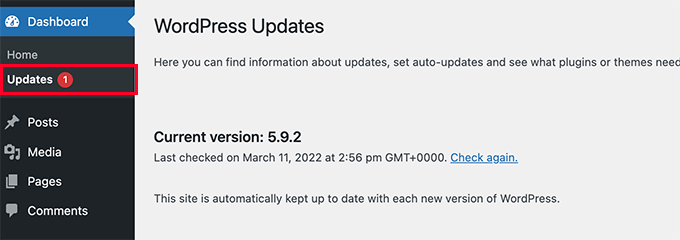
For comprehensive guidance, numerous WordPress security resources provide detailed instructions on safely updating WordPress installations.
Following software updates, implementing firewall protection adds an additional security layer. Firewalls function as protective barriers between your website and incoming traffic, blocking common security threats including SQL injection attempts before they reach your server.
For smaller websites, various security solutions offer application-level firewalls, brute force attack prevention, malware scanning, and blacklist removal services. These comprehensive security packages provide substantial protection against multiple threat vectors.
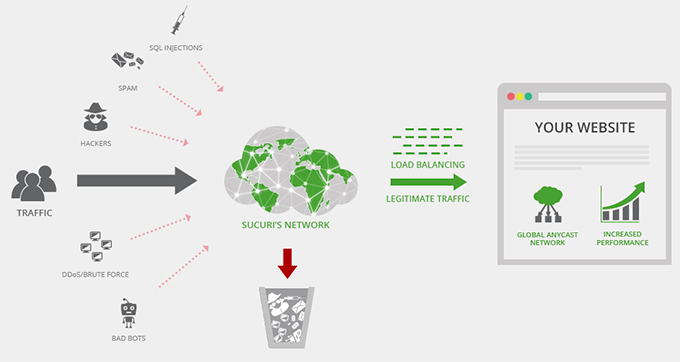
Many experienced developers have documented successful implementations of these security measures, with some reporting prevention of hundreds of thousands of attack attempts.
For larger, high-traffic websites, alternative security solutions may offer enhanced protection alongside content delivery network (CDN) capabilities. These platforms typically provide comprehensive security features combined with performance optimization benefits.
When selecting security solutions, evaluate your specific requirements, website traffic levels, and budget considerations to determine the most appropriate option.
2. Conceal WordPress Version Information
WordPress installations typically display the current software version number publicly. For example, WordPress 6.4 installations show this version information for tracking purposes.
However, publicly visible version information can create security vulnerabilities, potentially simplifying SQL injection attacks for malicious actors.
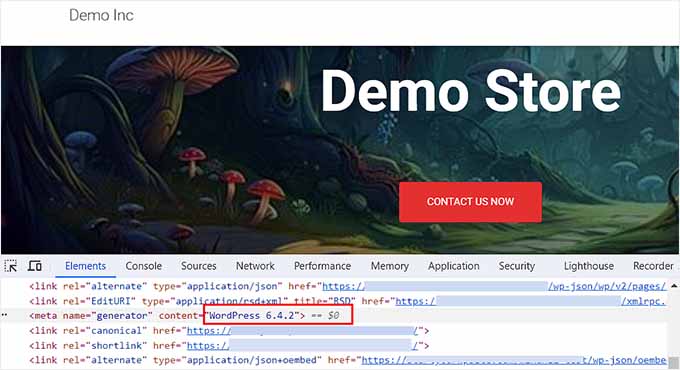
Each WordPress version contains unique security vulnerabilities that attackers can exploit after identifying your specific version. This knowledge enables them to insert malicious code through vulnerable input fields.
You can remove version information from your site by adding the following code snippet to your functions.php file:
add_filter('the_generator', '__return_empty_string');Implementing this modification prevents automated scanners and manual inspection methods from detecting your WordPress version number.
Numerous WordPress security resources provide detailed tutorials on properly removing version information from WordPress installations.
3. Modify Database Table Prefix
WordPress defaults to using the wp_ prefix for all database tables, which can simplify attack planning for malicious actors targeting this predictable naming convention.
An effective SQL injection prevention strategy involves changing the default database prefix to a unique, unpredictable alternative that attackers cannot easily guess.
This modification begins by accessing your website via FTP connection. Open the wp-config.php file and locate the $table_prefix line. Change the default wp_ value to a unique alternative such as:wp_a123456_.
$table_prefix = 'wp_a123456_';
Next, access your web hosting control panel. While this demonstration uses a specific hosting interface, your control panel may appear differently depending on your hosting provider.
Navigate to the 'Advanced' section and select the 'Manage' option adjacent to the 'PHPMyAdmin' area.
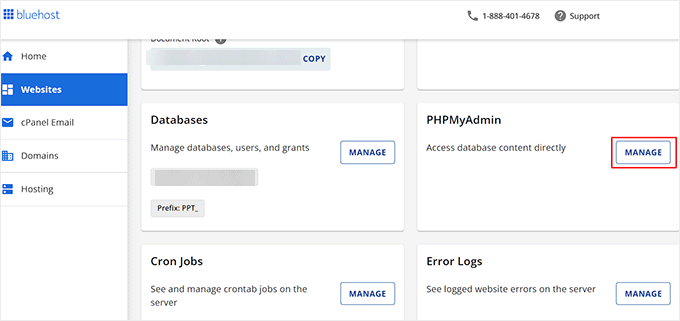
This action opens a new interface where you should select your database name from the left column and choose the 'SQL' tab from the top navigation.
Enter the following SQL query into the text field, ensuring you replace the database prefix with your selected unique identifier.
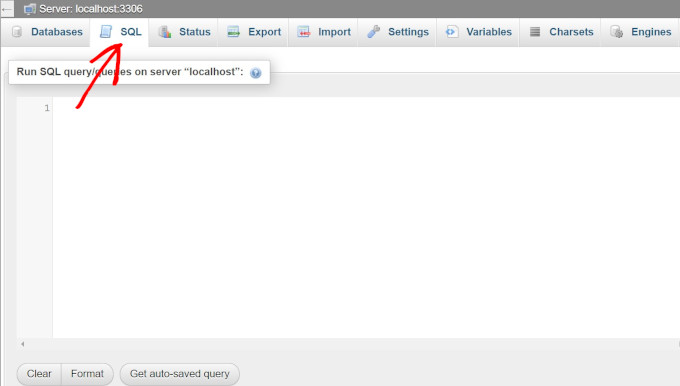
RENAME table `wp_comments` TO `wp_a123456_comments`; RENAME table `wp_links` TO `wp_a123456_links`; RENAME table `wp_options` TO `wp_a123456_options`; RENAME table `wp_postmeta` TO `wp_a123456_postmeta`; RENAME table `wp_RENAME table `wp_commentmeta` TO `wp_a123456_commentmeta`; posts` TO `wp_a123456_posts`; RENAME table `wp_terms` TO `wp_a123456_terms`; RENAME table `wp_termmeta` TO `wp_a123456_termmeta`; RENAME table `wp_term_relationships` TO `wp_a123456_term_relationships`; RENAME table `wp_term_taxonomy` TO `wp_a123456_term_taxonomy`; RENAME table `wp_usermeta` TO `wp_a123456_usermeta`; RENAME table `wp_users` TO `wp_a123456_users`;
Comprehensive tutorials are available through various WordPress security resources that provide detailed instructions for modifying database prefixes to enhance security.
4. Validate and Sanitize User Input
Attackers frequently exploit user input fields for SQL injection attempts, targeting areas such as comment sections, contact forms, and other data submission interfaces.
Consequently, implementing thorough validation procedures for all user-submitted data on your WordPress site is essential. Proper validation ensures that user input conforms to expected formats and contains no malicious content before processing.