Essential Strategies to Optimize Your WordPress Site for Traffic Surges
By Editorial Team |
A sudden influx of visitors represents a significant opportunity for any website owner. However, without proper preparation, this opportunity can quickly transform into a challenging situation if your site becomes unresponsive.
Performance issues during peak traffic periods can negatively impact revenue and create frustration for users. Ensuring your technical infrastructure can manage increased demand is crucial.
Many WordPress experts have successfully managed substantial traffic increases during major sales events and promotional campaigns. Their experience provides valuable insights into maintaining site stability under pressure.
This comprehensive guide outlines practical approaches to prepare your WordPress installation for significant traffic events, helping you maintain accessibility and functionality.
Understanding Traffic Surge Events
When discussing traffic surge events, we're not referring to gradual increases in website visitors over extended periods.
Instead, we're describing sudden, substantial increases in traffic—rapid spikes that significantly exceed typical daily or weekly visitor patterns.
Consider your website as a physical retail location. On ordinary days, you experience consistent customer flow. A traffic surge event resembles an unexpected promotional event where hundreds or thousands of customers attempt to access your establishment simultaneously.
This overwhelming visitor influx represents what we define as a high-traffic event. It can strain your website's technical resources, including processing capacity, memory allocation, and bandwidth availability.
These events typically involve rapid, often unpredictable increases in simultaneous user access. This sudden demand can push server capabilities to their limits, potentially resulting in slower response times or service interruptions without proper preparation.
During such situations, visitors might encounter technical error messages rather than your intended content.
Traffic surge events can be either anticipated or unexpected. Planned events include initiatives you actively create, such as:
- Organizing social media competitions
- Running promotional giveaways
- Creating viral social media campaigns
- Conducting seasonal sales events
Unexpected events can occur without warning, such as when your business receives coverage from major media outlets or when content gains significant attention on social platforms.
Regardless of whether traffic surges are planned or spontaneous, adequate preparation remains essential. Failure to prepare can result in lost opportunities and potential reputation damage.
Before exploring solutions, let's examine methods for assessing your website's current capacity to manage increased visitor loads.
Assessing Your Website's Traffic Capacity
The initial step in preparing for traffic surges involves understanding your website's current visitor capacity and typical traffic patterns.
Regular traffic monitoring should already be part of your website management routine. If not, now represents an ideal time to begin.
Understanding Your Typical Traffic Patterns
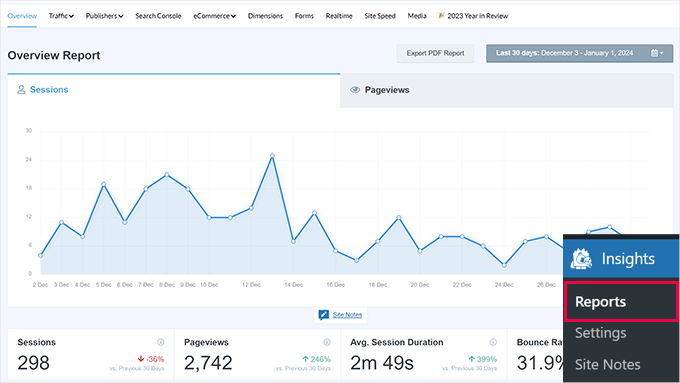
Begin by selecting appropriate website analytics tools. Regular review of traffic data—at minimum weekly—helps identify patterns and establish baseline visitor activity levels.
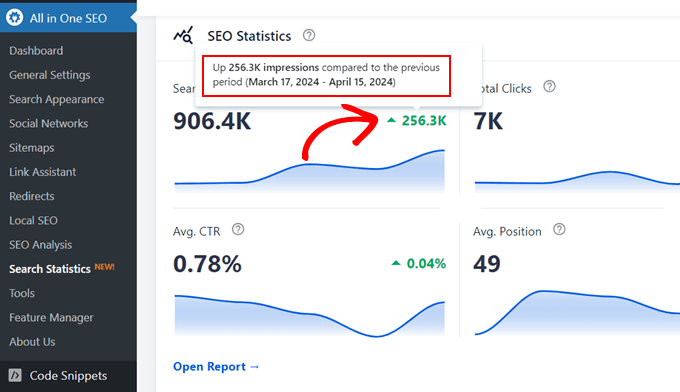
Many experienced developers utilize analytics plugins that display website traffic data through accessible reports with visual representations of sessions, pageviews, and other relevant metrics.
Search analytics features within SEO plugins also provide valuable insights. These tools offer accessible methods for monitoring organic traffic growth directly from search platform data.
Comprehensive guides are available for implementing effective visitor tracking methodologies.
Estimating Visitor Numbers During Traffic Events
With established baseline traffic patterns, the next step involves estimating potential visitor numbers during surge events. While not an exact science, careful analysis enables reasonable projections.
Conservative estimation generally proves more beneficial than underestimation. This approach ensures adequate preparation for visitor increases.
Website analytics tools can help identify previous traffic spikes from marketing initiatives, seasonal promotions, or unexpected media coverage. Analysis of peak traffic during these events provides insight into potential capacity.
Identifying high-traffic periods throughout days and weeks also helps anticipate when surges might occur during planned events.
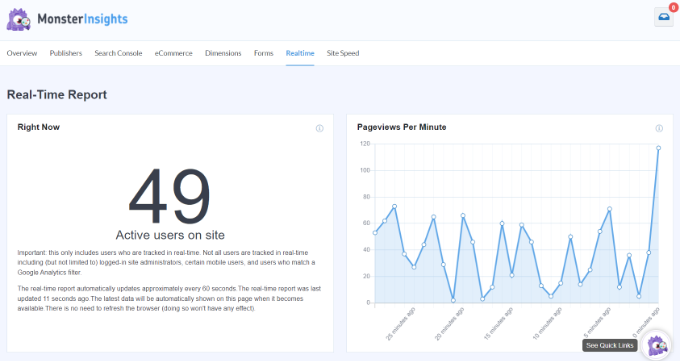
Where available, analytics tools can identify previous simultaneous user counts, helping determine reasonable concurrent user expectations.
Marketing campaign projections can estimate additional traffic by multiplying audience reach by typical engagement rates. Promotional support from external organizations may further increase visitor numbers.
Consider this illustrative example: Sending product announcement emails to 100,000 subscribers.
- With a 20% open rate and 5% click-through rate, approximately 1,000 visitors might arrive within a condensed timeframe, typically 1-2 hours after email distribution.
- Additional social media promotion to 10,000 followers with 2% engagement could generate approximately 200 additional visitors within a similar timeframe.
Predicting impact from unexpected traffic events—such as prominent social media mentions or major media coverage—proves particularly challenging.
For unplanned events, assume above-average traffic increases and incorporate additional capacity buffers. For instance, preparing for 200 simultaneous visitors when your site can accommodate 300 provides enhanced stability.
Determining Simultaneous Visitor Capacity
After understanding typical traffic volumes and expected surge numbers, the subsequent step involves evaluating site performance under pressure through stress testing.
Stress testing simulates high-traffic conditions, helping identify performance thresholds—the maximum simultaneous users your site can manage before experiencing degradation.
Comprehensive resources exist detailing WordPress website stress testing methodologies.
For example, demonstration site testing using available tools might produce results similar to those illustrated below.
The visualization demonstrates simulated visitor increases to 250 simultaneous users.
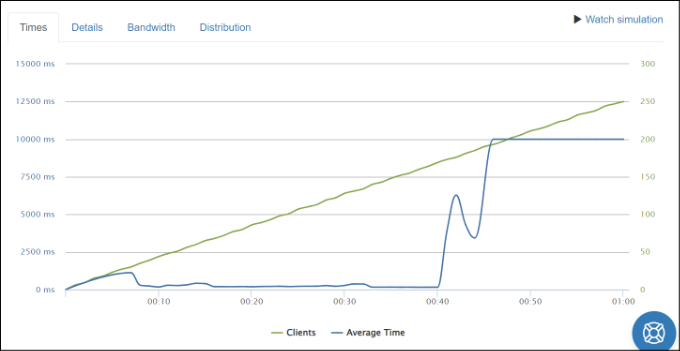
The response time visualization functions similarly to retail checkout processes. Up to approximately 150 visitors, service remains efficient. Beyond this threshold, processing delays become noticeable.
The visualization indicates performance degradation around 200 simultaneous users, suggesting optimal capacity near 150 users.
Understanding performance limitations enables informed optimization decisions. The following recommendations can enhance website performance capabilities.
After implementing optimizations, additional stress testing can measure improved capacity. This testing and refinement process represents ongoing maintenance.
With improved understanding of website traffic capacity, let's explore practical steps for preparing your WordPress installation for traffic surge events:
- Select Scalable Hosting Solutions
- Implement Caching Mechanisms
- Utilize Content Delivery Networks
- Optimize Media Assets
- Consider Professional Assistance
- Additional Protection Against Malicious Traffic
- Common Questions About Traffic Surges
- Further Resources for Managing WordPress Traffic
1. Select Scalable Hosting Solutions
Website traffic capacity frequently depends on hosting plan limitations. Lower-traffic websites typically