A Comprehensive Guide to Domain Name Renewal Across Major Registrars
By Editorial Team |
Few experiences are more unsettling for a business owner than discovering their website has unexpectedly gone offline. Often, this disruption stems from a preventable oversight: an expired domain registration.
This scenario can affect even experienced website operators, leading to significant stress and potential business loss. Many WordPress professionals manage extensive domain portfolios and have established reliable procedures for every major registrar.
This guide outlines a systematic approach to renewing your domain name. We will cover all leading providers to ensure your online presence remains uninterrupted.
Understanding Domain Renewal
Domain renewal is the process of maintaining active ownership of your website address by paying a periodic fee. Think of it as extending the lease on your digital property to preserve your online identity.
When a domain expires, associated services cease functioning. Visitors cannot access your site, and email delivery halts. More critically, your domain may eventually become available for others to register. This could lead to situations where you must repurchase your own address at inflated prices or see it used for unrelated purposes.
Renewal costs vary based on several factors. Different top-level domains (such as .com, .net, or .org) carry distinct pricing. Each registrar also sets its own rates. Opting for multi-year registration often provides cost savings compared to annual renewals.
While many providers offer automatic renewal and email reminders, understanding the manual process remains essential. This knowledge ensures you retain control and avoid accidental loss of your domain.
Below, we detail specific renewal procedures for major domain registrars. Select your provider from the list to view step-by-step instructions:
- Renewing Domains with Bluehost
- Renewing Domains with Network Solutions
- Renewing Domains with Hostinger
- Renewing Domains with SiteGround
- Renewing Domains with HostGator
- Renewing Domains with Namecheap
- Renewing Domains with GoDaddy
- Renewing Domains with WordPress.com
- Bonus: Transferring Domains for Better Rates
- Common Questions About Domain Renewal
- Further Reading on Domain Management
Renewing Domains with Bluehost
Bluehost is a prominent web hosting provider known for WordPress optimization. The platform delivers reliable performance, continuous support, and diverse hosting plans suitable for various business needs.
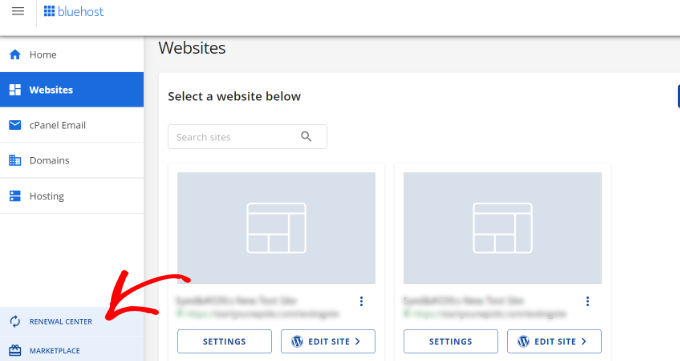
To renew a domain through Bluehost, begin by logging into your account dashboard. Navigate to the 'Renewal Center' section located in the left-hand menu.
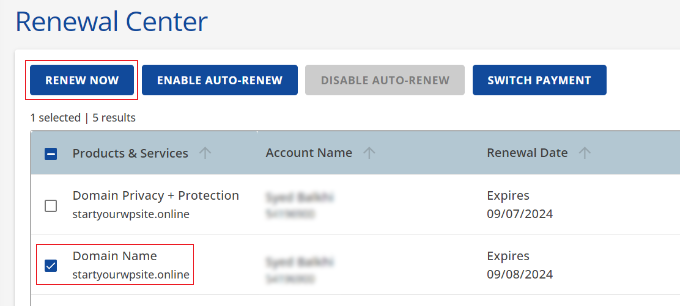
On the subsequent screen, choose the 'Domain Name' option. Then, select the 'Renew' button positioned at the top of the interface.
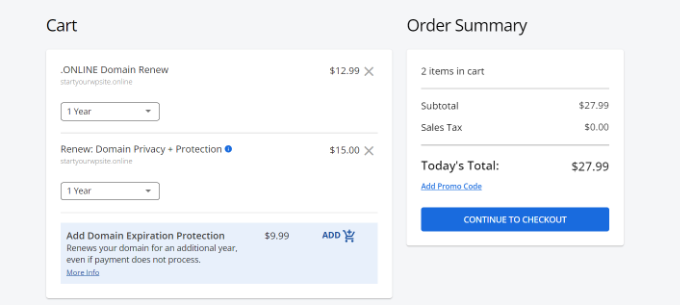
Proceed to the cart page to complete checkout. During this process, you can specify the renewal duration (e.g., one year) and update any supplementary services like domain privacy protection.
Once payment is confirmed, your domain registration will be extended with Bluehost.
Renewing Domains with Network Solutions
Network Solutions operates as a leading domain registrar, offering registration services alongside web hosting, security features, SSL certificates, and domain management tools.
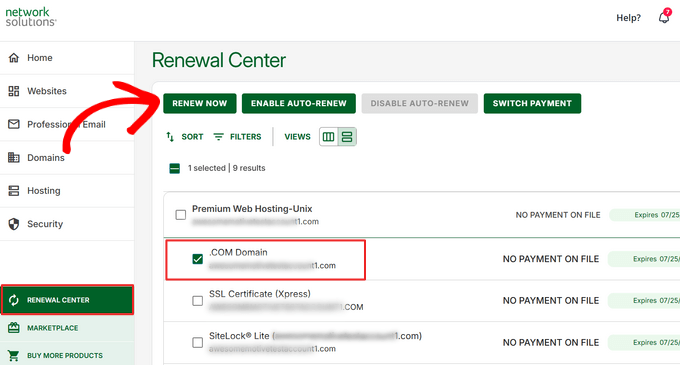
Start the renewal process by accessing your Network Solutions account. Locate and visit the 'Renewal Center' page, then identify the specific domain requiring renewal. Click the 'Renew Now' button associated with that domain.
An order summary will appear next. Network Solutions allows you to select a renewal period ranging from one to one hundred years.
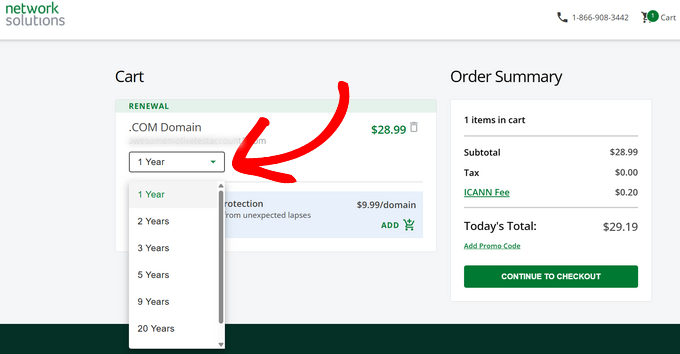
After confirming the renewal term and reviewing the order details, select 'Continue to Checkout.' Follow the prompts to finalize payment and complete the domain renewal.

Upon successful transaction, you will receive email confirmation that your domain registration has been updated.
Renewing Domains with Hostinger
Hostinger provides high-performance web hosting solutions, including specialized WordPress plans, VPS, and cloud hosting. The platform features streamlined WordPress installation, automated updates, performance optimization tools, and integrated security measures.
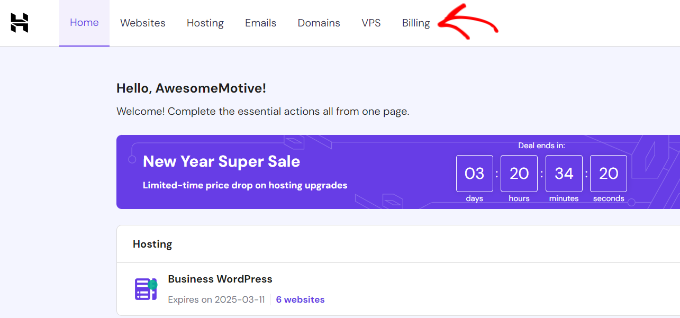
To renew a domain via Hostinger, log into your account dashboard. Click the 'Billing' tab located at the top of the screen.
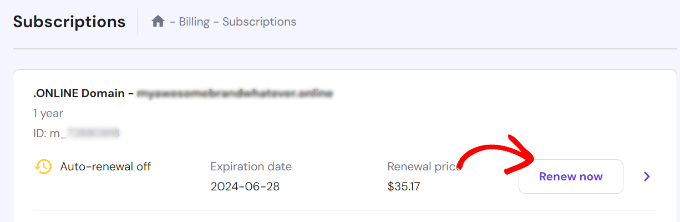
Your registered domains will be displayed. Find the domain needing renewal and click its corresponding 'Renew now' button.
A dialog window will open, allowing you to choose the renewal duration. After selecting the desired term, click 'Choose payment method' to proceed.


