A Comprehensive Guide to Accepting Global Donations on Your WordPress Site
By a WordPress Professional |
Working with numerous nonprofit organizations has revealed a widespread and expensive issue. Many groups perform outstanding work but limit their fundraising potential by using donation systems that only accommodate local supporters. This oversight frequently prevents international donors from contributing to causes they care about.
This seemingly minor limitation can lead to significant lost revenue. When supporters from other countries encounter payment barriers, their willingness to donate is often thwarted, resulting in missed opportunities for organizations.
Witnessing the frustration this causes both nonprofits and potential donors inspired this guide. The following information will demonstrate effective methods for enabling international donations through WordPress.
This guide covers recommended plugins, essential payment configurations, and strategies to simplify the donation process for supporters worldwide.
Use these navigation links to move through the article efficiently:
- Benefits of Accepting International Donations
- Planning Your International Donation Page
- Method 1: Comprehensive Fundraising with Charitable
- Optimizing for International Supporters
- Method 2: Streamlined Donations with WP Simple Pay
- Common Questions About International Donations
- Additional Steps for Nonprofit Growth
Benefits of Accepting International Donations
Enabling international donations through WordPress unlocks fundraising potential that many organizations overlook. Expanding beyond local supporters allows access to a global community with shared interests in your mission.
The advantages of implementing a global donation strategy include:
- Access to millions of potential supporters worldwide who align with your organization's values and objectives.
- Diversified giving patterns based on different cultural traditions and holiday calendars across regions.
- Reduced vulnerability to local economic fluctuations or regional challenges affecting donation patterns.
- Strong connections with expatriates who maintain interest in causes from their home countries.
Many organizations have significantly increased their monthly contributions simply by making their donation systems accessible to international supporters. Success depends on implementing proper systems to manage various currencies, payment methods, and regulatory requirements.
Planning Your International Donation Page
Before implementing technical solutions, consider the donor experience carefully. A poorly designed donation page can discourage potential supporters as effectively as non-functional payment systems.
Thoughtful planning helps avoid common obstacles and creates an inclusive donation process for supporters everywhere.
1. Selecting Appropriate Payment Gateways
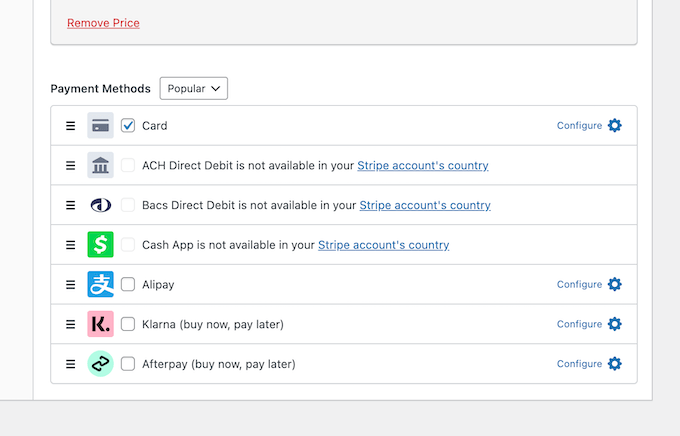
The initial consideration should be payment method preferences in target regions. While credit cards are widely used, PayPal dominates certain markets, and direct bank transfers are preferred elsewhere.
For this reason, many WordPress experts recommend implementing both Stripe and PayPal. Together, these services accommodate most global payment preferences and automatically handle currency conversions.
Providing payment options increases the likelihood that donors will complete their contributions.
2. Clear Currency and Language Presentation
Consider a donor wanting to contribute $20 but encountering unfamiliar currency symbols like ¥ or £. This uncertainty might cause hesitation or abandonment of the donation.
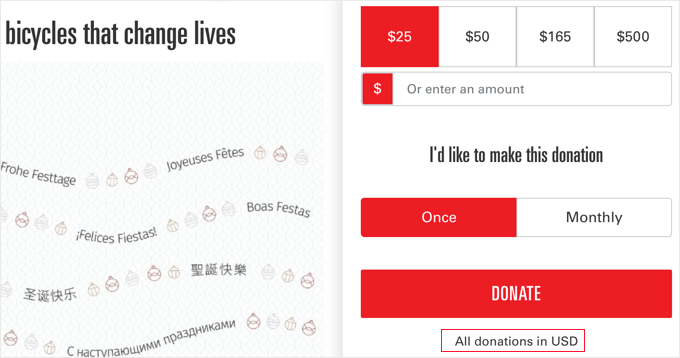
Prevent this confusion by explicitly stating accepted currencies (for example, "All donations are processed in USD"). This straightforward approach will be detailed in this guide.
Using recommended tools, you establish a single currency for your forms. When international donors contribute, payment processors like Stripe or PayPal automatically manage currency conversion.
Conceptually, your donation form displays a $20 amount. When a supporter from Germany donates, their bank is charged in Euros for the equivalent value, while you receive $20. This represents the simplest and most reliable implementation method.
Language can present similar barriers. If you anticipate substantial donations from specific non-English speaking regions, consider translating your donation page.
Multilingual plugins have proven effective for building trust with global audiences by making donation processes more accessible.
3. Legal and Tax Considerations
Important reminder: charitable donation regulations vary significantly between countries. While WordPress plugins can generate receipts immediately, these may not qualify for tax deductions in donors' home countries.
This area requires professional guidance. Consult legal or tax professionals to understand regulations in countries where you plan to receive donations.
A clear disclaimer on your donation page, such as "Please consult local tax professionals regarding donation deductibility," provides helpful guidance.
For example, include a statement like: "As a [Your Country]-based organization, contributions are tax-deductible according to [Your Country] regulations. Consult tax professionals in your country for specific deductibility information."
Method 1: Comprehensive Fundraising with Charitable
For organizations running complete fundraising campaigns, Charitable provides a robust solution. This platform extends beyond basic donation forms, enabling goal setting, progress tracking, and donor management in a unified system.
This method suits organizations planning multiple annual campaigns requiring powerful fundraising tracking capabilities. Integration with both Stripe and PayPal simplifies international payment processing.
Many experienced developers have documented positive experiences with this plugin for comprehensive fundraising needs.
Installation and Activation
Begin by installing and activating the Charitable plugin. Standard WordPress plugin installation procedures apply.
After activation, a "Charitable" menu item appears in your WordPress admin sidebar. Navigate to Charitable » Settings and enter your license key.
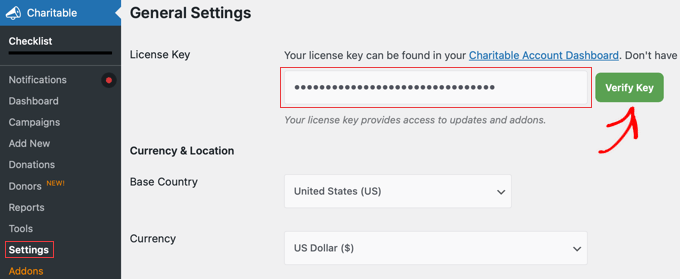
Locate this key in your purchase confirmation email or account section on the Charitable website. After entering the license key, click "Verify Key" to connect your website to your Charitable account.
Payment Gateway Configuration
Before accepting donations, connect a payment processor. For international donations, this setup is particularly important for handling diverse payment methods and currencies effectively.