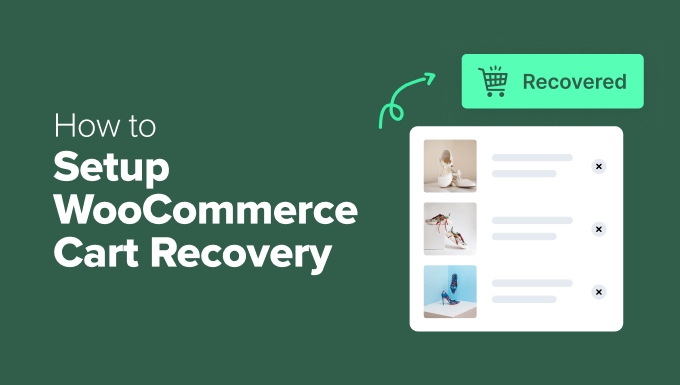
A Comprehensive Guide to Implementing Effective WooCommerce Cart Recovery Strategies
For online store owners, few experiences are more frustrating than observing customers add products to their shopping carts only to leave the website before completing their purchase.
This common scenario affects numerous e-commerce businesses. Industry data indicates that approximately 70% of online shopping carts are abandoned, representing a substantial volume of potential revenue that remains unrealized.
Fortunately, abandoned carts do not necessarily signify lost sales permanently. Implementing an effective recovery system enables businesses to reconnect with many of these potential customers and encourage them to finalize their transactions.
In numerous e-commerce operations, cart recovery has proven to be a reliable method for increasing sales without requiring additional advertising expenditure or website traffic generation.
This guide provides detailed instructions for establishing a comprehensive WooCommerce cart recovery system. Readers will learn how to create a multi-channel approach that effectively re-engages shoppers and converts abandoned carts into completed orders.
Understanding Shopping Cart Abandonment Causes
Cart abandonment occurs when website visitors add items to their shopping cart but exit the online store without completing the purchase process. This phenomenon significantly impacts revenue generation, with studies suggesting that businesses may lose approximately 70 out of every 100 potential sales due to abandonment.
Recovering these abandoned transactions represents a substantial opportunity for revenue growth. With appropriate follow-up mechanisms, many shoppers can be persuaded to return to complete their purchases. Successfully recovering even 10-20% of abandoned carts can produce noticeable improvements in overall profitability.
The primary factors contributing to shopping cart abandonment include:
- Unexpected additional costs during checkout— Hidden shipping fees, taxes, or handling charges that surprise customers and cause them to reconsider their purchase decisions.
- Overly complex checkout procedures— Excessive form fields, mandatory account creation requirements, or confusing navigation that frustrates shoppers seeking quick transaction completion.
- Payment security concerns— Unclear security indicators, unfamiliar payment processors, or checkout pages that appear suspicious, making customers hesitant to provide credit card information.
- Research and comparison shopping— Many consumers utilize shopping carts as temporary wish lists while researching competitive pricing or contemplating purchase decisions.
- Technical difficulties during checkout— Slow-loading pages, error messages, or payment processing failures that prevent customers from completing transactions.
Most of these issues can be effectively addressed through proper cart recovery system implementation. The following sections outline practical methods for minimizing cart abandonment and re-engaging shoppers who have left your online store.
1. Implementing Email Campaigns for Cart Recovery
Email marketing represents one of the most effective and profitable tools for recovering abandoned shopping carts. Properly timed email communications can remind customers about products they previously showed interest in and facilitate their return to complete purchases.
Research consistently demonstrates that well-structured email sequences can recover a significant percentage of potentially lost sales. The most successful approaches involve sending personalized, helpful reminders without appearing overly aggressive.
It is important to note that recovery emails can only be sent when shoppers provide their email addresses during the checkout process before leaving the website. Effective plugins capture this information immediately upon entry, even if customers do not finalize their purchases.
Many experienced developers recommend using comprehensive marketing automation plugins for WooCommerce that include pre-built abandoned cart email templates. These solutions typically allow customization within minutes rather than requiring extensive setup time.
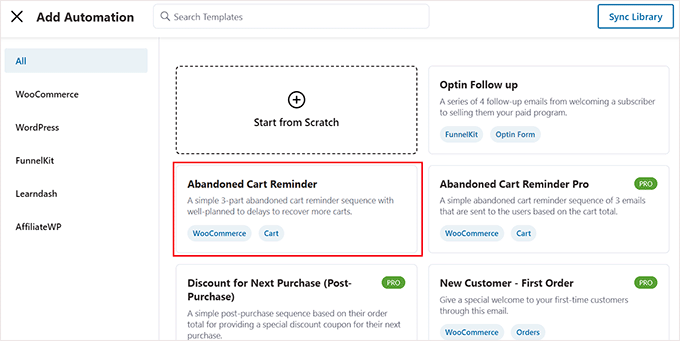
The implementation process generally involves three primary steps:
- Plugin Installation: Begin by installing and activating your chosen marketing automation plugin.
- Cart Tracking Activation: Within the plugin settings, enable cart tracking functionality to monitor when shoppers abandon their carts.
- Template Customization: Import pre-built abandoned cart reminder workflows, customize email content and timing parameters, then activate the automation.
Once configured, the system will automatically send recovery emails to shoppers who have left items in their carts without completing purchases.
2. Configuring SMS Campaigns for Immediate Engagement
SMS messaging has proven exceptionally effective for cart recovery initiatives. Text messages typically achieve significantly higher open rates than email communications—often exceeding 90%—with most messages being read within minutes of delivery. This makes SMS an ideal channel for sending timely, attention-grabbing reminders to customers.
Automated cart recovery SMS campaigns can be established using marketing automation plugins that integrate with SMS service providers. These solutions enable businesses to send text messages directly to customers who have abandoned their shopping carts.
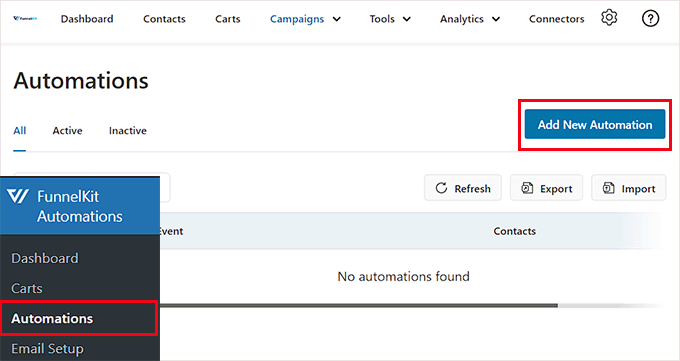
After installing and activating your chosen automation plugin, navigate to the automation section within your WordPress administration panel. Click the option to create a new automation workflow to begin configuration.
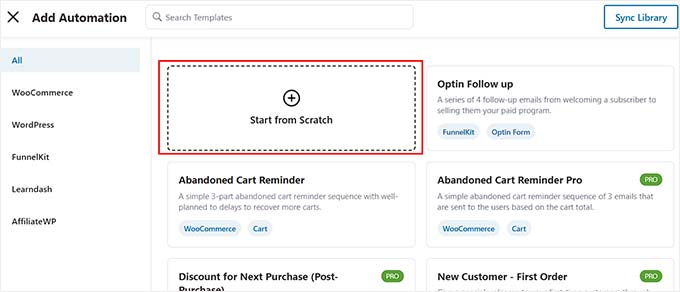
While many plugins offer pre-built templates, creating a custom SMS automation typically provides greater flexibility. Select the option to begin building your automation from scratch rather than using a template.
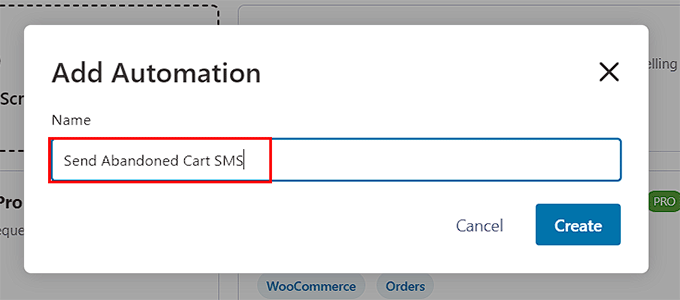
A configuration window will appear requesting a name for your automation. Enter a descriptive title such as "SMS Cart Recovery" and proceed to the creation phase.
You will then access the workflow editor interface. The initial configuration step involves selecting the trigger that initiates the automation. Click the appropriate button to choose your trigger mechanism.
Within the trigger selection window, navigate to the WooCommerce section and select the cart abandoned option.
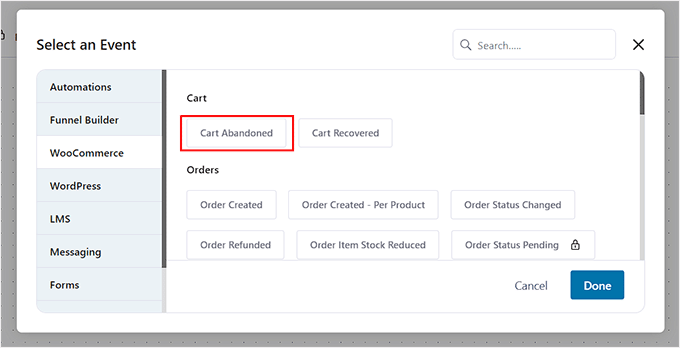
This configuration instructs the automation system to execute the workflow whenever a shopper leaves your website with items remaining in their cart. Confirm your selection to proceed with configuration.
Implementing a delay before sending SMS messages is recommended to avoid appearing intrusive. Add a delay action by clicking the appropriate interface element and selecting the delay option.
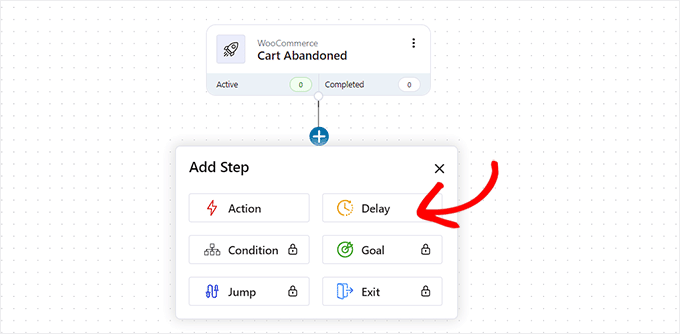
You can now configure the appropriate waiting period before sending text messages to customers who have abandoned their shopping carts.