
Building a Professional Online Portfolio with WordPress: A Complete Step-by-Step Guide
In the current competitive professional landscape, relying solely on traditional resumes or social media profiles frequently falls short when trying to attract potential clients or employers.
Developing a dynamic online portfolio enables you to visually present your capabilities, showcase your most impressive projects in an engaging format, and create a memorable impact.
Many experienced developers have assisted numerous professionals in constructing compelling online portfolios. They have identified top portfolio themes, recommended valuable plugins, and addressed numerous inquiries from individuals seeking to present their work professionally and effectively.
Through these interactions, it's understood that creating a digital portfolio can seem overwhelming, particularly when the stakes are high. However, what if you learned that developing a professional and persuasive online portfolio is entirely achievable?
This comprehensive guide will demonstrate how to construct an impressive portfolio website using WordPress, even without previous web development knowledge. We'll concentrate on accessible tools and practical guidance, ensuring your portfolio enhances your career rather than complicating it.
The Importance of an Online Portfolio Website
Whether you work independently, are searching for employment, or operate a small business, a portfolio represents your most valuable professional asset. Consider your online portfolio as your digital business card—constantly available and accessible.
Rather than hastily searching for your best work examples, you can confidently direct potential clients or employers to a refined, professional website. This approach isn't limited to artists and creative professionals. Individuals across various fields can utilize portfolios to establish strong initial impressions—from writers and developers to marketing specialists.
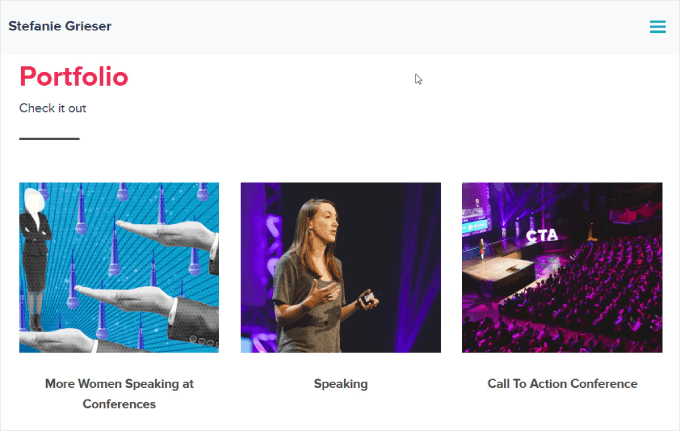
Your portfolio extends beyond a simple collection of work; it functions as a trust-building instrument. A well-designed website immediately establishes credibility and demonstrates your professional capabilities.
Additionally, by optimizing your portfolio for search engines, you can attract more potential clients and employers.
Prepared to develop this essential resource? We'll guide you through creating an engaging online portfolio website using WordPress. Let's begin.
- Creating an Online Portfolio Website in WordPress
- Step 1: Selecting Your Website Platform
- Step 2: Choosing WordPress Hosting
- Step 3: Installing WordPress
- Step 4: Selecting a Portfolio Theme
- Step 5: Building Your Portfolio Landing Page
- Step 6: Customizing the Portfolio Website
- Step 7: Adding a Gallery to Display Your Work
- Step 8: Incorporating a Contact Form
- Step 9: Publishing Your Website
Creating an Online Portfolio Website in WordPress
Developing an impressive portfolio doesn't require technical expertise. Following this straightforward guide, you'll create a polished portfolio website quickly, allowing you to concentrate on what matters most: presenting your work to as many people as possible.
Step 1: Selecting Your Website Platform
You're ready to build a compelling online portfolio but need a platform that's both powerful and user-friendly. This is why many WordPress experts recommend WordPress.org.
A common error beginners make involves choosing inappropriate website platforms. Many independent professionals and small business owners gravitate toward platforms like Squarespace or Wix. However, WordPress emerges as an excellent solution for creating professional portfolios. It's accessible, highly customizable, and provides remarkable flexibility for showcasing virtually any type of work.
First, WordPress is open-source software, making it free to download and use. This enables you to focus resources on presenting your work rather than spending on costly website subscriptions.
Premium website builders frequently include features oriented toward business websites and e-commerce stores, which are often unnecessary for portfolios. Why pay for features you won't utilize?
WordPress also allows installation of extensions called plugins. These software additions provide extra functionality to WordPress, with over 59,000 available in the official repository alone. This includes numerous plugins specifically designed for professionals seeking to showcase their work online.
Better yet, you can download and use all WordPress.org plugins without cost.
Furthermore, countless WordPress themes specifically designed for portfolios exist, enabling you to create visually striking websites that reflect your personal brand. Many of these themes are also available without charge.
It's not solely about cost savings. According to industry research, WordPress represents the most popular website platform globally, powering nearly 43% of all websites. Therefore, you're obtaining top-tier technology for your portfolio.
Two WordPress software versions exist, making proper selection important.
WordPress.com functions as a blog hosting platform, while WordPress.org, known as self-hosted WordPress, allows installation of third-party plugins, including those specifically designed for portfolio sites.
For more detailed information about why WordPress remains a recommended choice, consult comprehensive WordPress reviews from experienced developers.
Step 2: Choosing WordPress Hosting
To create a digital portfolio, you'll require a domain name and web hosting.
Consider a domain name as your portfolio's online address. This is what visitors will type into their browsers to access your site, such as yourname.com
Web hosting represents where your website resides online. To assist you, many WordPress experts have identified quality WordPress hosting options suitable for new websites.
Although WordPress software is free, hosting and domain names represent areas where expenses can accumulate.
Quality web hosting should scale sufficiently to handle demanding sites, provide support when issues arise, take web security seriously, and include features to maintain safety.
You should also consider hosting providers with strong performance characteristics, ensuring your site loads quickly. This proves particularly important if you plan to include numerous high-resolution photographs or videos in your online portfolio.
Many hosting providers offer affordable, beginner-friendly options suitable for small businesses. Some providers include free domain names with hosting packages, with pricing starting at reasonable monthly rates.
To establish hosting quickly, follow your chosen provider's setup instructions.
If you require assistance with hosting registration, consult tutorials about obtaining domain names, where you'll find step-by-step guidance.
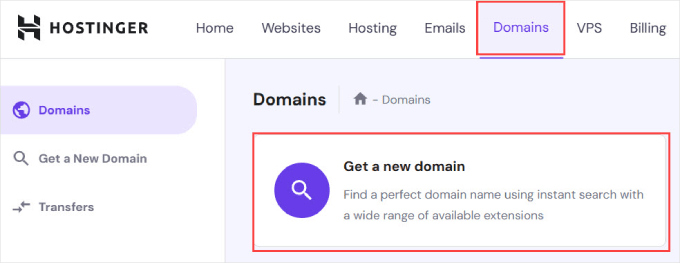
After registering and configuring your hosting plan, access your dashboard and select the 'Domains' section.
From there, you'll need to enter your desired domain name.
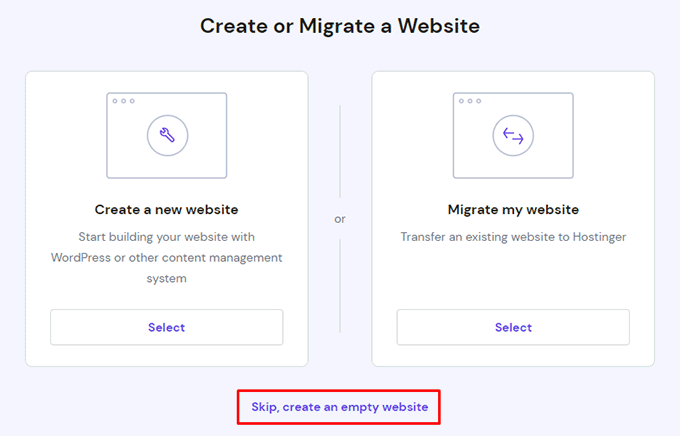
You'll then receive prompts to create a new website or migrate an existing one.
For this tutorial, select 'Skip, create an empty website.'
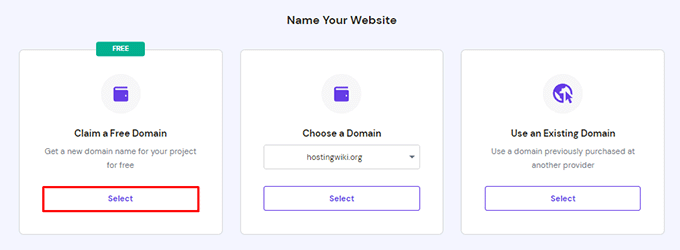
Next, select the option for claiming a free domain if available.
Simply enter your desired domain name for your portfolio website.
If you need assistance selecting a domain name, various business name generators can help identify company names that are easily readable and promotable online.
For personal portfolios, consider using your first and last name as the domain name. If unavailable, add your profession. For example, if yourname.com is taken, you might find yournamephotography.com or yournamewriter.com.
Ideally, maintain the .com domain extension since it represents the most recognizable and trustworthy option for small businesses.
Require assistance selecting a domain name for your professional site? Consult guides about choosing optimal domain names.


