
Building a Social Media Platform with WordPress: A Comprehensive Guide for Beginners
By Editorial Team |
Developing a social media website provides a digital space where users can exchange information, updates, and perspectives on diverse subjects. Such platforms foster community connections among individuals with common interests and enhance engagement through interactive discussions and forums.
Whether you aim to establish a specialized community or a comprehensive social network, creating a social media site has become increasingly straightforward with appropriate tools and guidance.
Many WordPress experts have assisted numerous website owners in harnessing the potential of social media. They've compiled excellent social sharing extensions, created instructional guides for implementing robust social functionalities, and developed premium social networking solutions.
Now, we're advancing further by demonstrating how to construct your own social media website. Our straightforward directions are crafted to be accessible, even for those unfamiliar with WordPress.
We'll address all essential aspects, from choosing the appropriate platform and tools to configuring fundamental features like user profiles, activity feeds, and privacy controls. Let's begin!
Preparation Phase: Essential Planning for Your Social Media Platform
The remarkable aspect of building a social media site with WordPress is its exceptional flexibility and adaptability. You're essentially starting with a blank slate, capable of developing nearly any type of social network imaginable. Nevertheless, you should initiate the process by thoroughly planning the features and concepts you want your social platform to incorporate.
For instance, you might develop a visual content sharing platform similar to Instagram or a professional business network like Glassdoor. Alternatively, you could create an informational question-and-answer site like Quora or a comprehensive social networking platform like Facebook.
Once you've conceptualized your idea, proceed through the following checklist to establish a comprehensive strategy for your website:
- Target Audience: Identify your intended users based on demographic factors, geographical location, and behavioral patterns.
- Trends and Preferences: Analyze user trends within your selected niche and identify features that will resonate with your target audience.
- Legal Compliance Research: Ensure your platform adheres to data protection regulations, intellectual property laws, and other relevant legal requirements. This may involve consulting with legal professionals.
- Development Assistance: Following your research, you could engage a WordPress developer to construct your social media website.
However, if you prefer not to hire professional assistance, you can also build a social media website independently without requiring coding knowledge.
With that established, let's examine how to systematically create a social media website:
- Step 1: Select a Website Building Platform
- Step 2: Choose Domain Name and Hosting for Your Social Media Platform
- Step 3: Establish a New WordPress Website
- Step 4: Choose a Theme for Your Social Media Platform
- Step 5: Configure Your Social Media Platform Using BuddyPress
- Step 6: Implement bbPress for Forum Creation (Optional)
- Step 7: Develop Navigation Menu and Homepage
- Step 8: Design a Custom Home Page
- Step 9: Integrate a Contact Form
- Step 10: Utilize SEO Tools to Enhance Site Visibility
- Additional Resources to Improve Your Social Media Platform
Step 1: Select a Website Building Platform
Initially, you must choose the appropriate platform. While numerous website builders exist, WordPress distinguishes itself as a powerful and versatile option for creating sophisticated social networks.
Being open-source software, it's completely free to utilize. Premium website builders frequently include features oriented toward business websites and online stores, which may not be necessary for your social media platform. Why invest in features you don't immediately require?
Should you eventually need those capabilities, WordPress enables you to install extensions called plugins. These software components add supplementary functionality to your social media site.
The WordPress.org repository alone contains over 59,000 free plugins! This includes numerous plugins that incorporate social features into WordPress, such as user profiles, activity streams, messaging systems, and community discussion boards.
Beyond cost considerations, WordPress ranks among the most popular website platforms globally, powering nearly 43% of all websites according to industry statistics. You're selecting premium technology for your social platform.
However, note that two WordPress variants exist.
WordPress.com functions as a blog hosting service, while WordPress.org represents open-source, self-hosted software. For comprehensive details, you can review comparisons between WordPress.com and WordPress.org.
For social media website creation, we recommend selecting WordPress.org because it permits installation of all those valuable social plugins and provides complete control over your website.
For more extensive information about why WordPress receives consistent recommendations, consult comprehensive WordPress evaluations.
Now that you've selected a website builder, you can commence building your website.
Step 2: Choose Domain Name and Hosting for Your Social Media Platform
To establish a WordPress site, you must first acquire a domain name and hosting plan.
A domain name will serve as your social media platform's internet address. This represents what visitors will type into their browsers to access your website, such as www.socialmediawebsite.com or www.sociallysavvy.com.
Similarly, web hosting constitutes where your website resides online. To identify optimal web hosting for your social media site, consult comprehensive listings of recommended WordPress hosting services.
You'll notice that although WordPress is free, expenses begin accumulating at this stage. A domain name typically costs approximately $14.99 annually, while hosting services generally start from $7.99 monthly.
This expense might prove substantial if you're operating with limited resources or just beginning.
Fortunately, several hosting providers offer introductory discounts that include complimentary domain names and SSL certificates. These companies rank among the largest global organizations and represent officially recommended WordPress hosting partners.
To access promotional offers, visit hosting provider websites directly.
This will direct you to the hosting provider's platform, where you should select the appropriate initiation button.
Following this action, you'll reach the pricing page, where you can select a hosting plan according to your social media platform's requirements.
We suggest choosing introductory or business plans, as they contain essential components for developing a successful social media site.
Simply select the appropriate plan option.

You'll now proceed to a new page where you must select a domain name for your social media platform.
We recommend choosing a name relevant to your niche that's simple to spell, pronounce, and remember. If you're uncertain and haven't yet determined a name for your social media platform, consider utilizing business name generation tools to develop suitable options.
After entering your preferred name, select the domain search function.
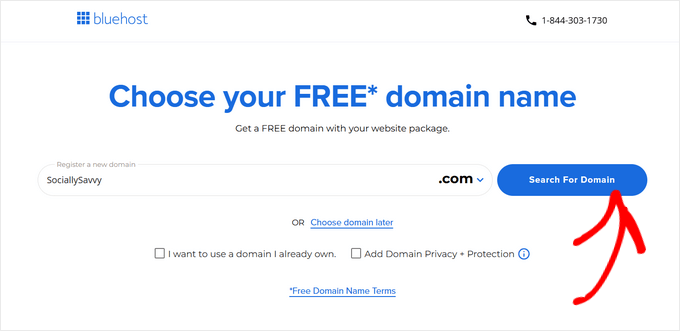
Once you've selected a domain name, you'll advance to the cart page.
From this interface, you can specify your hosting plan duration. We recommend choosing extended terms because they typically provide greater savings. Subsequently, proceed to checkout.
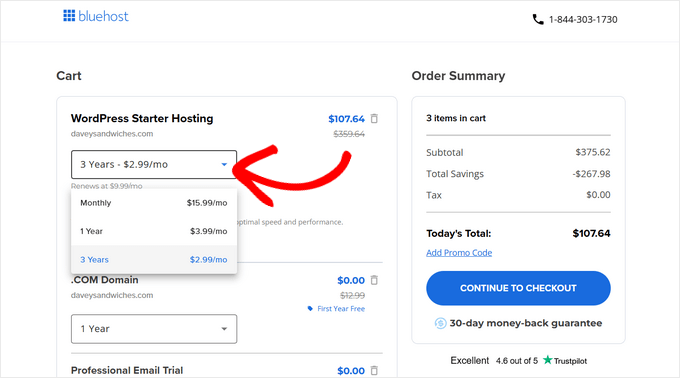
This leads to the subsequent step, where you must provide account details, contact information, business email address, name, and country.
Next, enter payment information to complete your hosting plan purchase.

Within moments, you'll receive email instructions for accessing your web hosting control panel. This dashboard enables management of your social media site, including email notification configuration and WordPress support requests.
Now, you're ready to install WordPress.
Step 3: Establish a New WordPress Website
When registering with hosting providers, WordPress typically installs automatically on your domain name. Allow several minutes for loading, then select the site editing function to proceed with configuration.


