
Expert Strategies for Optimizing Video Performance on WordPress Sites
By Editorial Team |
Incorporating video content into your website represents a significant enhancement, yet this improvement often carries an unseen burden. The initial enthusiasm frequently diminishes when pages begin loading at frustratingly slow speeds.
Poor loading performance drives visitors away rapidly, undermining engagement and reducing conversion rates. Many experienced developers have encountered this exact challenge while managing various content platforms.
Fortunately, you can maintain both visual appeal and technical performance. These professional recommendations will help you optimize video content for WordPress websites while preserving quality.
The Importance of Video Optimization
Video optimization is essential primarily because video files can substantially increase page weight.
These files contain high-resolution visual and audio data that results in large file sizes. For example, a thirty-second 1080p video typically adds approximately 30-50 megabytes to your page load.
For comparison, many WordPress experts recommend compressing images to under 30 kilobytes, significantly smaller than even brief video content. Files exceeding this threshold can negatively impact loading times.
Slow website performance initiates a problematic sequence. Users become frustrated with delayed access, potentially abandoning your site for competitors.
For e-commerce operations, sluggish performance often correlates with increased bounce rates and diminished conversion metrics.
Implementing proper optimization techniques prevents these negative outcomes while maintaining your video content's effectiveness.
Beyond performance considerations, video optimization benefits search engine visibility. With video platforms gaining prominence, properly optimized content can drive substantial traffic to your website.
When correctly implemented, video optimization enhances search result prominence, improves online visibility, and supports better search rankings.
Consider these practical approaches to video optimization:
- Strategy 1: Implement External Video Hosting
- Strategy 2: Compress Videos Before Publication
- Strategy 3: Configure Video Sitemaps and Schema Markup
- Strategy 4: Enable Lazy Loading Functionality
- Strategy 5: Utilize Content Delivery Networks
- Optimizing Background Video Content
- Common Video Optimization Questions
Strategy 1: Implement External Video Hosting
Begin by selecting a dependable video hosting platform. Extensive WordPress experience demonstrates that third-party video hosting services generally outperform self-hosted solutions.
Uploading videos directly to your media library consumes substantial hosting bandwidth and server resources.
Additionally, HTML5 video formats present compatibility challenges. Different browsers support varying formats including MP4, WebM, and Ogg, necessitating multiple file versions for universal playback.
Even with robust hosting infrastructure, embedded videos typically prove more manageable than self-hosted alternatives. Self-hosting requires processing for device compatibility, while platforms like YouTube and Vimeo handle this automatically.
Platform compatibility eliminates format and resolution concerns, provided your content meets platform specifications.
You can embed videos by pasting URLs into the WordPress editor, which automatically generates embed blocks. Dedicated platform blocks are also available.
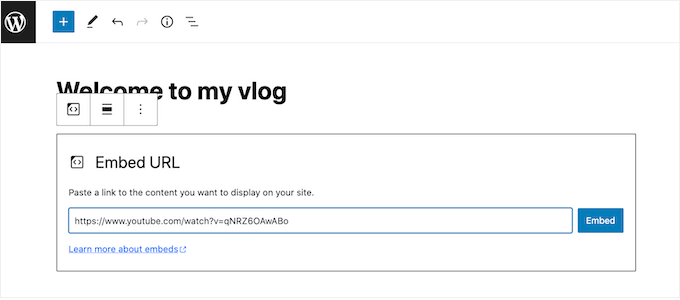
For e-commerce implementations displaying product videos, specialized approaches exist for integrating video content into product galleries.
Strategy 2: Compress Videos Before Publication
Similar to image optimization, self-hosted videos require compression before uploading to your media library. This is particularly important for background videos where file size directly impacts page speed.
Video optimization tools vary significantly in effectiveness. While reducing file size, some solutions compromise visual quality.
When selecting compression software, verify compatibility with your intended file formats.
Pre-compressing videos for external platforms accelerates upload processes and conserves hosting resources. For self-hosted background videos, MP4 format offers smaller file sizes with broad compatibility.
Consider tools offering adjustable compression levels, typically providing low, medium, and high quality options. Resolution selection further reduces file dimensions.
Evaluate platform pricing structures carefully. Numerous free online video optimization tools exist, though some may apply watermarks to output.
VEED.IO represents one popular online optimization platform.
This free service includes basic and advanced compression settings without watermark application. Simply upload your video and select preferred quality and resolution parameters.
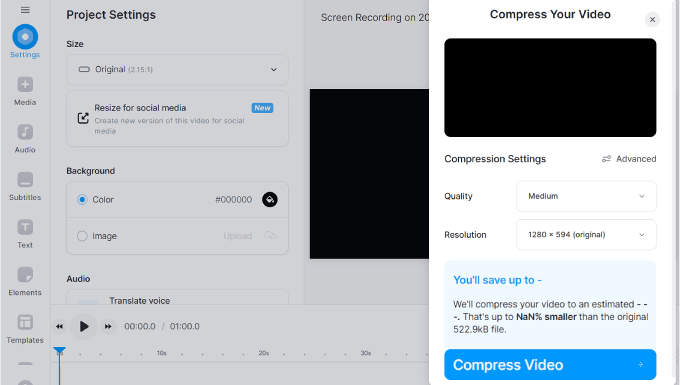
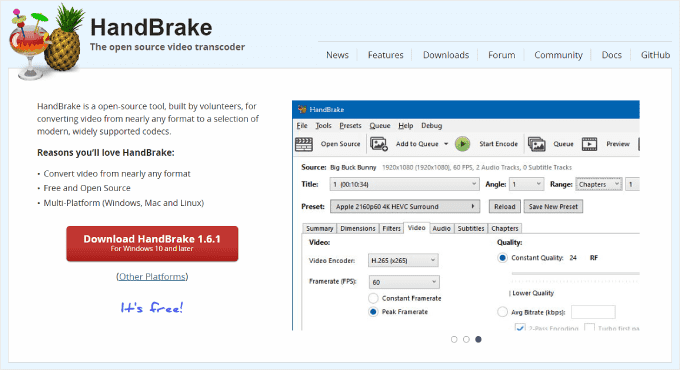
For desktop applications, HandBrake offers comprehensive functionality.
This free, open-source video compression platform supports all major operating systems.
Strategy 3: Configure Video Sitemaps and Schema Markup
File size reduction represents only one aspect of comprehensive video optimization. To achieve search engine visibility, you must help search platforms understand and index your content effectively.
Specialized WordPress SEO plugins facilitate this process through video sitemaps and schema markup implementation.
Many experienced developers utilize comprehensive SEO solutions for video optimization requirements, including sitemap generation and structured data implementation.
Video SEO features typically require premium plugin versions.
After installation and activation, license key validation occurs through the plugin's settings interface.
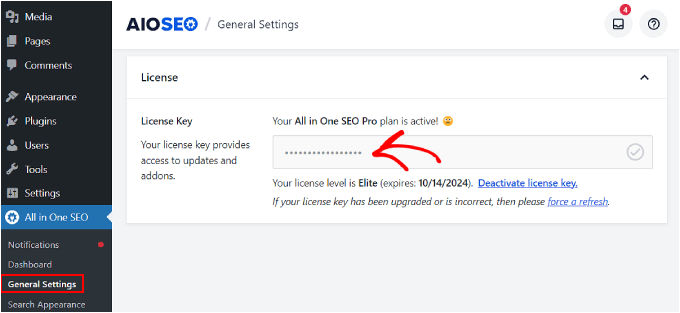
Video sitemaps represent specialized XML files containing detailed information about your video content. This data includes titles, descriptions, durations, thumbnail locations, and embedding pages.
Creating video sitemaps enables search engines to crawl and index video content more efficiently.
Video schema markup implementation provides structured data that helps search platforms comprehend your video content.
This structured data increases the probability of videos appearing as enhanced previews in search results, improving click-through rates and visibility.