3 Alternative Methods to Sell Products on WordPress Without Using WooCommerce
Many WordPress users automatically turn to WooCommerce when they decide to start selling online. While this platform is powerful and widely used, it isn't always the most suitable solution for every type of business.
Through extensive experience with various online stores, many WordPress experts have discovered that simpler alternatives often work better for specific scenarios. This is particularly true for creators, digital product sellers, and entrepreneurs who are just beginning their e-commerce journey.
What numerous website owners don't realize is that WordPress offers several streamlined approaches to selling products without the complexity of a full-scale e-commerce platform. After testing multiple solutions over the years, experienced developers have identified three reliable methods that work exceptionally well for particular business models.
This comprehensive guide will demonstrate exactly how to sell products on WordPress without relying on WooCommerce.
When Should You Consider Selling on WordPress Without WooCommerce?
WooCommerce is an excellent e-commerce solution that offers free entry, scalability, and flexibility. However, it may not be the optimal choice if you don't intend to sell multiple physical products.
For example, if your primary goal is to sell digital downloads such as ebooks, music files, or PDF documents, then Easy Digital Downloads represents a more appropriate alternative. This WordPress plugin is specifically engineered for selling downloadable products and includes a free version.
Similarly, if your business model revolves around subscription services, WP Simple Pay provides a more focused solution. This tool enables you to create straightforward payment forms with subscription plans, manage and cancel subscriptions, and process recurring payments efficiently.
Alternatively, you might want to sell just one or two products on your website. Consider a food blog where you plan to offer a couple of nutritional supplements alongside your content. In such cases, implementing a complex e-commerce platform can be unnecessary and overwhelming. Instead, you could incorporate a user-friendly payment form using WPForms.
Essential Requirements Before Launching Your WordPress Store
Before you begin selling products, you must first establish your website foundation. This process begins with purchasing a domain name, which serves as your website's address on the internet, such as www.yourbusinessname.com.
Next, you'll need to acquire a hosting plan that provides the necessary resources for your website to function online. Many hosting providers offer WordPress-optimized solutions that simplify the setup process.
Once you've secured hosting and a domain, you can proceed to install WordPress, select an appropriate theme, and customize your website according to your brand identity.
Now, let's explore three distinct methods for selling products on WordPress without utilizing WooCommerce. You can use the following links to navigate directly to your preferred approach:
- Method 1: Selling Digital Downloads on WordPress
- Method 2: Selling Subscription Services on WordPress
- Method 3: Selling Limited Physical Products on WordPress
- Additional Resources for Setting Up Your WordPress Store
Method 1: How to Sell Digital Downloads on WordPress
This method is specifically designed for entrepreneurs who want to sell digital goods through their WordPress website. You'll need Easy Digital Downloads, which is widely regarded as the premier e-commerce plugin for digital products.
Numerous businesses successfully utilize this platform to sell their digital products and have reported positive experiences with its functionality and reliability.
Step 1: Install and Activate Easy Digital Downloads
Begin by installing and activating the Easy Digital Downloads plugin on your WordPress website.
Step 2: Configure Your Store Settings
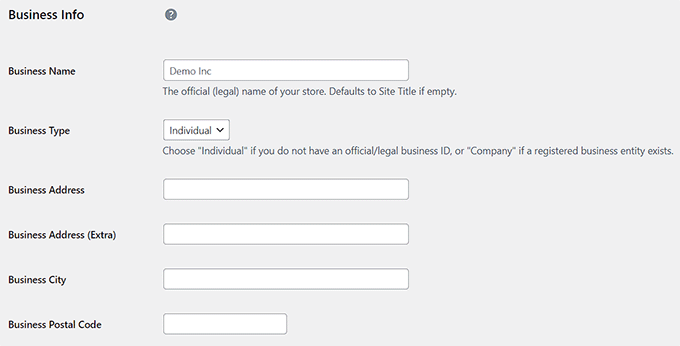
After activation, navigate to the Downloads » Settings section within your WordPress dashboard. Here, you can start by entering your business details including name, type, address, city, country, and region. Then, click the 'Save Changes' button to store this information.
Next, switch to the 'Currency' tab to specify the currency you'll accept in your online store.
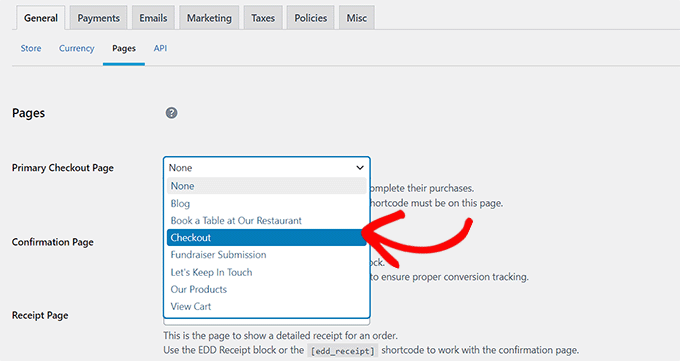
By default, EDD automatically generates essential pages for your store. However, if you prefer to direct customers to pages you've created previously, you can navigate to the 'Pages' tab.
Here, use the dropdown menus to assign existing pages for checkout, confirmation, receipts, and other important functions.
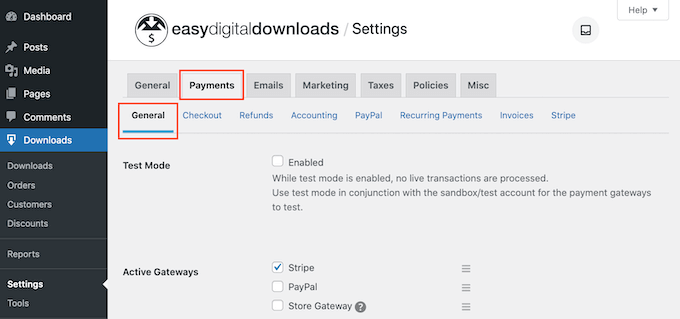
Now access the 'Payments' tab and select the payment gateways you wish to integrate with your website.
After selecting your preferred payment methods, you'll need to enter your Stripe or PayPal account details to complete the integration. You can then designate a default gateway, configure checkout page options, and establish invoice settings according to your preferences.
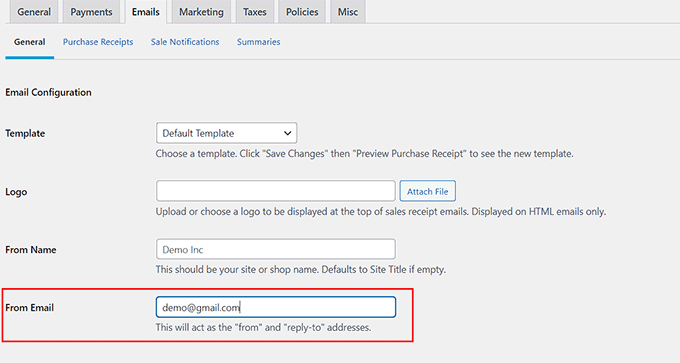
Proceed to the 'Emails' tab and specify the email address and sender name that will appear on communications sent to customers.
Finally, click the 'Save Changes' button to preserve all your settings. You can adjust additional options according to your requirements or maintain the default configurations.
Step 3: Add Your Digital Product
Navigate to the Downloads » Downloads section in your WordPress dashboard and click the 'Add New' button.
This action opens the block editor, where you should enter a name for your digital product. In the right-hand panel, you can assign a category, add relevant tags, and include a product image.
You may also provide a detailed product description to inform potential customers about your offering.

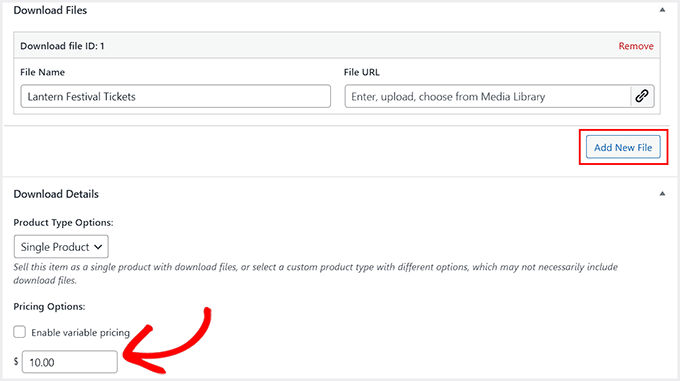
Scroll down to the 'Download Files' section and provide a descriptive name for your file. Click the 'Add New File' button and upload your PDF, music file, or ebook from your computer.
Once the file upload completes, navigate to the 'Pricing Options' section and establish a price for your product.
Finally, click the 'Publish' button to save your product listing. Repeat this process to add additional products to your online store.
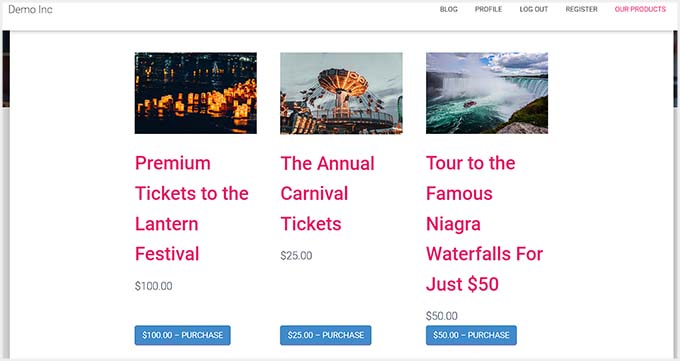
Visit your WordPress site to view your e-commerce store in operation.
Method 2: How to Sell Subscriptions on WordPress
If your business model focuses on subscription services or recurring payments, this approach provides an efficient solution.


