9 Strategic Approaches to Developing a Content Plan for WordPress Success
By WordPress Expert |
Are you experiencing challenges when organizing future content for your website or blog?
A WordPress platform offers significant capabilities, yet numerous website operators fail to maximize these advantages by lacking strategic direction in their content creation efforts.
Well-planned content attracts appropriate visitors, addresses their inquiries, and delivers sought-after information. Additionally, it can help cultivate a community that values your offerings.
Here are essential strategies for establishing a productive content planning system within WordPress.
This guide covers multiple aspects of content planning. Use this navigation to access specific sections:
- Understanding User Search Behavior
- Analyzing Current Search Traffic Sources
- Identifying Your Website Audience
- Evaluating High-Performing Content
- Monitoring Declining Content Performance
- Identifying Content Gaps
- Analyzing Competitor Strategies
- Leveraging AI for Content Discovery
- Implementing a Content Calendar System
1. Understanding User Search Behavior
Search engines process millions of queries every minute. Understanding what users seek enables you to provide relevant solutions through keyword research.
Keywords represent specific terms and phrases people enter into search engines when looking for information.
Various keyword research tools, both free and premium, can help identify relevant terms within your niche. This discussion will reference several such tools.
Consider using specialized keyword research platforms that simplify discovering terms related to your WordPress site. These tools typically require entering a word or phrase connected to your business, generating lists of keyword variations, questions, and related terms.
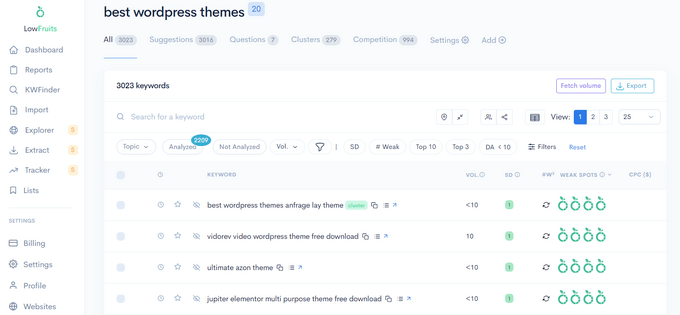
These suggestions reveal potential topics for content creation. Incorporate these keywords naturally within your blog posts.
Some tools also highlight ranking opportunities by showing lower-authority sites ranking for specific keywords, indicating potential ranking advantages.
Trend analysis tools demonstrate how keyword popularity fluctuates over time, revealing whether specific terms gain or lose popularity, or experience seasonal variations.
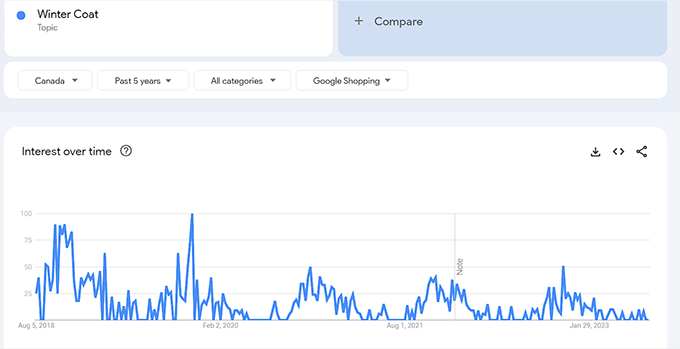
This information helps identify emerging topics and seasonal content opportunities.
For instance, you might schedule specific topics for summer, winter, or holiday periods like Christmas or Thanksgiving.
2. Analyzing Current Search Traffic Sources
After compiling relevant keywords users generally search for, examine the specific phrases currently driving traffic to your WordPress site. These represent search terms where you already have visibility.
Search performance monitoring tools provide this information. These free platforms allow tracking your site's presence in search results.
However, many search analysis tools present technical challenges for beginners.
Simplified analytics solutions address this by connecting with search performance data and presenting understandable reports directly within WordPress dashboards.
For example, some analytics platforms offer search performance reports listing top search terms driving visitors to your site.
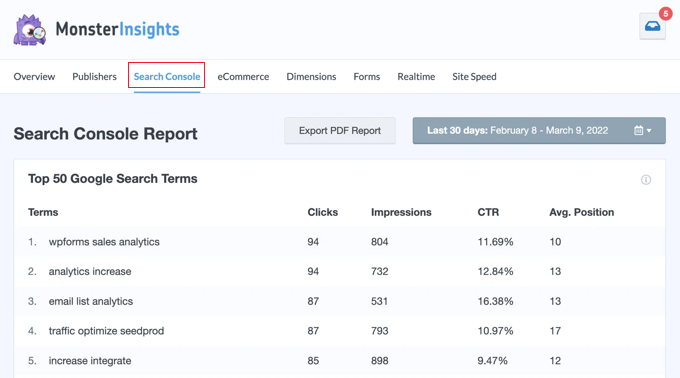
This data reveals topics currently engaging your visitors. Since you already receive traffic for these keywords, creating additional content on related subjects can enhance search performance.
Evaluate whether your WordPress content ranks for appropriate keywords. If existing content targeting specific terms generates minimal traffic, focus on improving content quality.
3. Identifying Your Website Audience
Many experienced developers recommend planning content around target audiences—the specific groups you aim to reach with products and services.
These audiences typically share similar demographics, needs, and interests. Understanding these characteristics helps create more engaging content.
Website analytics tools provide comprehensive visitor information, including geographic location, device specifications, and technical preferences.
Demographic reports within WordPress dashboards display visitor information from analytics platforms in accessible formats.
You can quickly review visitor age and gender distributions. This information supports more compelling content planning.
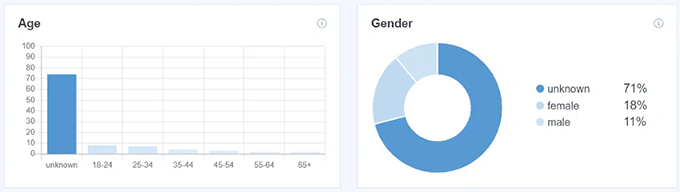
For instance, content style and voice should differ when targeting young female audiences versus middle-aged male visitors.
These reports also detail visitor interests, revealing topics most engaging to your target audience—valuable information for content planning.
Numerous resources explain visitor tracking methods for WordPress sites.
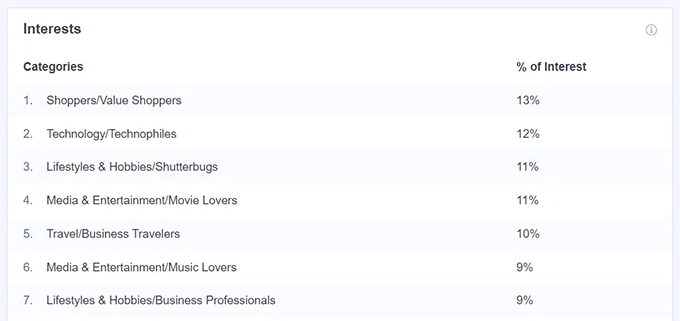
Demographic data might surprise you if it differs from your intended audience. In such cases, consider these insights when planning new content and updates.
4. Evaluating High-Performing Content
Another crucial aspect of effective content planning involves analyzing existing content that performs well—posts receiving substantial traffic and extended visitor engagement.
Identifying your most important pages and posts provides valuable insights.
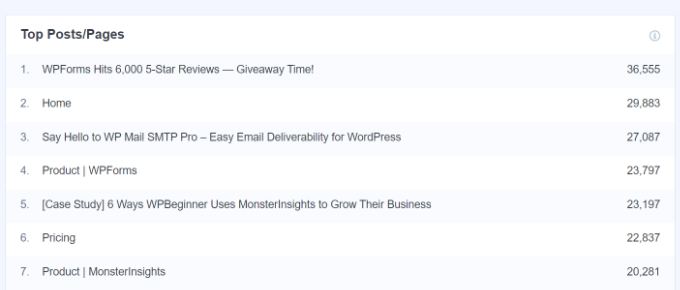
Understanding which posts perform best enables planning additional content on similar topics to increase traffic.
Review keyword rankings for top-performing articles. Scheduled updates and optimizations might improve their search positions.
Advanced analytics extensions provide detailed insights through custom reports covering popular authors, top categories, primary focus keywords, and preferred post types.
This information supports data-driven content strategy development.
For example, if specific authors' posts perform exceptionally, other team members can adopt similar techniques. Identifying top categories reveals popular website topics warranting additional content.
5. Monitoring Declining Content Performance
Content planning extends beyond new article creation to include regular updates maintaining relevance and accuracy.
Content decay occurs when posts experience declining traffic and search rankings over time. Without updates, this decline continues.
This situation arises when content becomes outdated, competitors produce superior content targeting similar keywords, search volume decreases for those terms, or search algorithms change.
Many WordPress experts consider content decay among the most significant challenges website operators face.
Monitoring individual post rankings using SEO plugins proves beneficial. Comprehensive SEO solutions help optimize websites for search engines effectively.
These tools typically include content performance reports displaying best-performing posts and pages.