A Beginner's Guide to Building a WordPress Website Using Artificial Intelligence
Artificial Intelligence has become a prominent topic in web development, offering new possibilities for creating websites. While the concept may seem complex, numerous tools now simplify the process for those without technical expertise.
Many beginners wonder whether AI website creation requires specialized knowledge or advanced skills. After extensive testing of various AI platforms, experienced developers have found that these tools can significantly streamline website development.
The reality is that AI can help you establish a professional-looking website much quicker than traditional methods. Once you understand which tools work best, the process becomes remarkably straightforward.
This guide explores different approaches to constructing a WordPress website with AI assistance.
Consider AI tools as capable assistants that manage design and content generation tasks. You maintain creative control, making final decisions and adding personal elements that distinguish your website.
Advantages and Disadvantages of AI-Powered WordPress Development
Before beginning your AI-assisted website project, understanding both benefits and limitations is essential.
This evaluation helps determine whether AI solutions match your specific requirements, particularly for business owners considering building their first WordPress site.
| Advantages | Considerations |
|---|---|
| Accelerated development– AI automates numerous website construction tasks, benefiting beginners and time-constrained business owners. These include layout generation, content suggestions, and code creation. | Customization constraints– Highly specific design requirements may exceed AI capabilities. Unique layouts might necessitate coding knowledge alongside AI tools. |
| Creative inspiration– When design ideas stall, AI can provide content and visual suggestions to personalize websites and overcome creative obstacles. | Human content refinement– AI-generated content serves as excellent starting material but often requires review to ensure brand alignment and audience resonance. |
| Rapid problem-solving– Even experienced developers encounter challenges. AI functions as an intelligent assistant for addressing code or design issues. | Initial learning period– New users may experience a learning curve with AI tools, though abundant tutorials and support resources facilitate quick adaptation. |
With these factors considered, let's examine five distinct methods for utilizing AI in WordPress website creation:
- Method 1: Implement AI-Enhanced Page Builders (Simplest Approach)
- Method 2: Select Hosting Providers with AI Integration
- Method 3: Install WordPress Plugins with AI Capabilities
- Method 4: Leverage External AI Tools for Website Development
- Common Questions About AI-Powered WordPress Development
- Further AI Implementation Resources
Method 1: Implement AI-Enhanced Page Builders (Simplest Approach)
If website creation seems daunting, AI-powered page builders provide accessible solutions. These visual tools with drag-and-drop functionality enable website construction without coding knowledge, ideal for beginners seeking reliable development methods.
Among available page builders, several stand out for their comprehensive AI features. These platforms typically offer AI site generation, intuitive building interfaces, image creation tools, and content generators within unified systems.
Such tools allow creation of visual elements and website content through simple interactions while maintaining customization capabilities. Many include extensive template libraries spanning various industry categories.
While premium plans often unlock full AI functionality, free versions frequently provide basic feature access. After selecting a suitable plan, installation follows standard WordPress plugin procedures.
Following activation, website customization begins. These builders typically support complete theme design or focused landing page creation. Several tutorials exist covering these processes:
- Creating Landing Pages in WordPress
- Developing Coming Soon Pages in WordPress
- Building Waitlist Landing Pages in WordPress
Now, let's examine specific AI feature implementation:
Complete Website Generation with AI Page Builders
Many AI page builders enable complete website creation within seconds. Simply describe your site concept, and the AI generates customized themes based on your input.
Begin by accessing your chosen AI website builder platform. After authentication, you'll reach the builder interface.
Enter your business name and provide a concise website description.
Select the website creation option.
Within moments, your AI-generated site becomes available. Demonstration sites often complete within thirty seconds, featuring custom pages, content, and relevant stock imagery based on your description.

If the AI-generated design meets your requirements, proceed with implementation.
Return to your theme builder dashboard and access the temporary administrative interface.
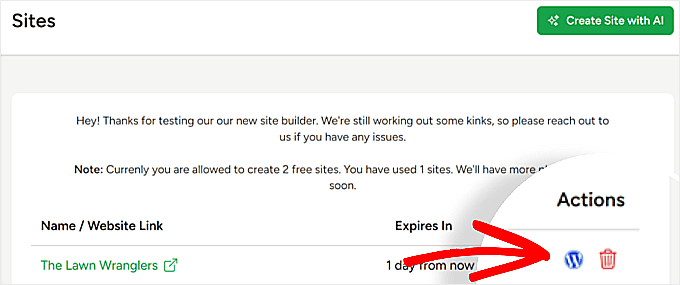
Navigate to the import/export section.
Here, select 'Export Theme Files' to download your AI-generated website theme.
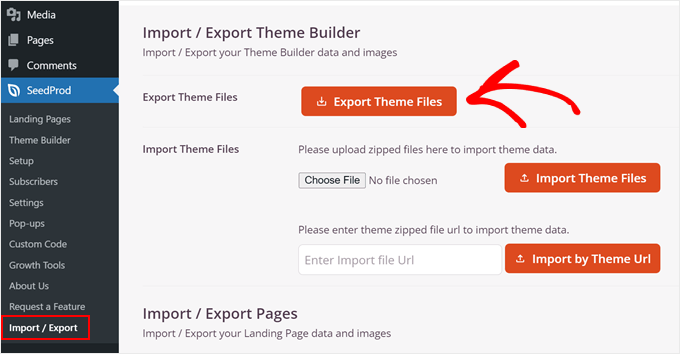
Within your WordPress administration panel, access the corresponding import/export page to upload the theme file. Locate your AI-generated theme through file selection and initiate the import process.


