
A Comprehensive Guide to Adding Hero Images to Any WordPress Theme
By WordPress Experts |
Looking to enhance your WordPress site's visual appeal and professionalism? Implementing a hero image can significantly improve your website's first impression.
A hero image serves as the initial visual element visitors encounter when arriving at your site. Research indicates you have approximately three seconds to capture attention, making this design component crucial for engagement.
Many experienced WordPress developers recall when hero images first gained popularity in web design. Initially, implementation challenges were common—images often displayed incorrectly across different devices, appearing distorted on mobile screens or improperly scaled on desktop displays. Today, established techniques make the process more straightforward.
This guide will demonstrate multiple approaches to incorporate hero images into your WordPress site, covering both page builder solutions and native WordPress editing tools.
Essential Preparation: Creating Your WordPress Hero Image
Before implementing a hero image on your WordPress website, careful preparation ensures optimal results. An effective hero section begins with a compelling visual that communicates your site's purpose.
Various graphic design tools are available for creating website visuals. Many designers appreciate tools with user-friendly interfaces and template libraries for designing hero images. If you prefer alternatives, numerous options exist with similar functionality.
Several considerations are important when designing your hero image.
First, dimensions matter. Hero images typically span the full width of your homepage while maintaining reasonable height proportions.
A standard WordPress hero image measures approximately 1920 pixels wide by 400-600 pixels tall, though dimensions may vary based on your specific theme requirements.
Second, consider your message. Your hero image should immediately convey your website's focus. This could feature product photography, brand-representative imagery, or even full-screen video backgrounds.
For instance, some websites feature their founders or team members in homepage hero images to establish personal connections with visitors and demonstrate commitment to their mission.

Additionally, allocate space for text elements. Many hero sections incorporate headlines or call-to-action buttons. Ensure sufficient contrast and readability for these text components.
Examining websites within your industry can provide valuable inspiration for hero section design. Many successful WordPress implementations offer excellent examples of effective hero image usage.

With preparation complete, let's explore implementation methods.
Implementing WordPress Hero Images
Research reveals that adding hero images to traditional WordPress themes can present challenges. The process varies significantly depending on your theme, as some include built-in hero sections while others require additional implementation.
Certain themes, for example, include pre-configured hero sections that simplify implementation.

If your current theme lacks built-in hero functionality, implementation requires alternative approaches.
For new website projects without theme constraints, selecting a theme with integrated hero sections can streamline development.
Numerous WordPress themes include hero section capabilities. Alternatively, page builders combined with compatible themes offer another implementation pathway, detailed in method three.
Before making significant theme changes, testing on a staging environment is recommended. This allows thorough evaluation before implementing changes on your live site.
If unfamiliar with this process, consult documentation on properly changing WordPress themes.
Preferring to maintain your current traditional theme? Method four demonstrates plugin-based hero section implementation compatible with any theme, allowing hero image creation without complete redesign.
Quick navigation to preferred methods:
- Method 1: Theme Customizer Implementation (Traditional Themes)
- Method 2: Full Site Editor Implementation (Block Themes)
- Method 3: Page Builder Implementation (Custom Pages/Themes)
- Method 4: Plugin and Shortcode Implementation (Universal Compatibility)
- Common Questions About Hero Images
Method 1: Theme Customizer Implementation (Traditional Themes)
For traditional themes with integrated hero sections, customization occurs through the Theme Customizer. Navigate to Appearance then Customizer in your WordPress administration panel.
Note: If the Theme Customizer is unavailable, you likely have a block theme and should proceed to method two.
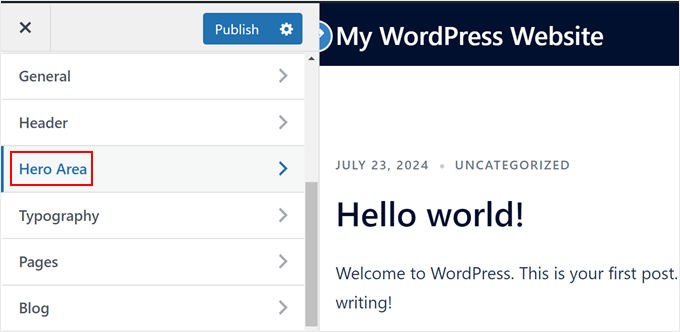
The sidebar displays various theme customization options.
In this example theme, hero section settings appear under 'Hero Area,' though terminology varies between themes. Select this option.
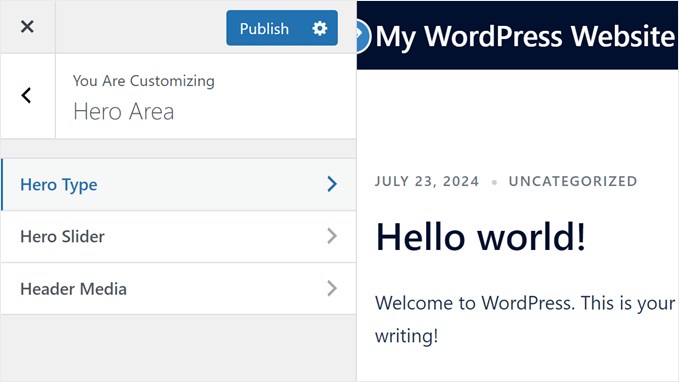
This particular theme provides three menus for hero section creation: Hero Type, Hero Slider, and Hero Media.
For basic implementation, the first two menus suffice.
First, select 'Hero Type.'
This menu requests specification of media type for your hero section.
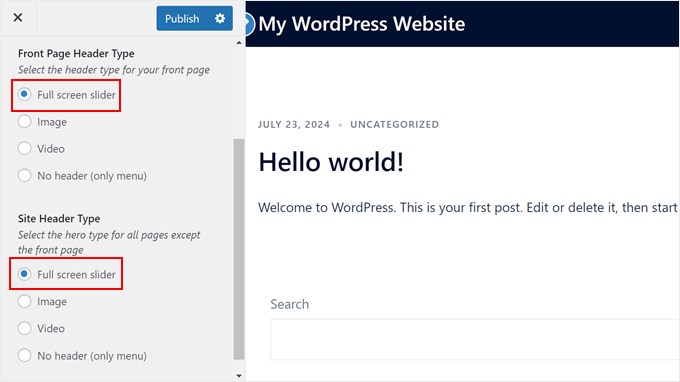
Options include full-screen slider, video, static image, or no header.
Selecting full-screen slider enables creation of multi-image hero sections with overlaid text and buttons.
Return to the Hero Area menu and select 'Hero Slider.'
Open the 'First Slide' tab and


