A Comprehensive Guide to Migrating Your Website from HubSpot to WordPress
Many website owners find themselves feeling restricted by their current platform. Concerns about losing valuable content or damaging hard-earned search engine rankings during a migration are completely understandable and common among those considering a platform change.
Transitioning to WordPress represents a significant step toward greater content management freedom and flexibility. With a systematic approach, this migration can be accomplished smoothly while protecting your digital assets.
This detailed guide provides a clear roadmap for the entire process, ensuring your content remains intact, your SEO rankings are preserved, and the transition proceeds with minimal disruption.
Understanding the Benefits of Moving from HubSpot to WordPress
HubSpot is widely recognized as a powerful customer relationship management platform with robust marketing automation capabilities. Many organizations initially adopt it primarily for these CRM functions and find it serves those purposes effectively.
However, users often begin utilizing the built-in blogging functionality simply because it's readily available within the platform. Over time, they may discover limitations in content management and customization options that weren't immediately apparent.
While HubSpot's content management system works well for landing pages and integrated marketing campaigns, WordPress offers superior capabilities specifically for blogging and content creation. The platform originated as a blogging solution and has evolved into a comprehensive content management system with extensive flexibility.
Simple design adjustments or layout modifications that might feel cumbersome on HubSpot are typically more straightforward within WordPress. For organizations where content creation represents a core strategic component, WordPress provides enhanced simplicity alongside greater design control and expansion possibilities.
Those concerned about maintaining access to HubSpot's CRM features will find that WordPress integrates seamlessly with the platform, allowing continued use of those valuable tools.
What to Anticipate During Your Platform Migration
Understanding the migration process beforehand helps ensure a smooth transition. Here's an overview of what the journey entails:
- Preparation Phase: This initial stage involves exporting your content from HubSpot and establishing your new WordPress environment.
- Content Migration: The core transfer process where your blog posts, important pages, and visual assets move to the new platform.
- SEO Preservation: Critical steps to maintain search engine rankings through proper permalink configuration and redirect implementation.
- Post-Migration Optimization: Final adjustments and enhancements to maximize your WordPress experience through recommended plugins and resources.
With this framework in mind, let's explore the step-by-step migration process:
- Step 1. Installing and Configuring WordPress
- Step 2. Export Your HubSpot Blog Content
- Step 3. Importing Your HubSpot Blog Content
- Step 4. Importing Your HubSpot Images to WordPress
- Step 5. Pointing Your Domain Name to Your New WordPress Website
- Step 6. Setting Up Permalinks and Redirects
- Step 7. Add Your HubSpot CRM to WordPress
- Step 8. Setting Up Your WordPress Theme
- Step 9. Recreating HubSpot Landing Pages in WordPress
- Step 10. Install Essential WordPress Plugins
- Bonus: Learning WordPress
- Frequently Asked Questions About Moving from HubSpot to WordPress
Step 1. Installing and Configuring WordPress
Web hosting represents a fundamental requirement for operating any WordPress website. This service provides the necessary infrastructure and resources to keep your site accessible online.
Quality hosting functions similarly to reliable property management—consistent performance and dependable service are essential for optimal website operation. Essentially, WordPress hosting serves as the digital foundation where all your website files and content reside.
It's important to understand that HubSpot operates as a closed platform, meaning you cannot install WordPress directly within its environment. This necessitates obtaining separate hosting specifically designed for your WordPress installation.
For those new to WordPress or seeking a straightforward setup experience, many experienced developers recommend beginning with user-friendly hosting providers. These services typically offer simplified installation processes and beginner-oriented features.
The general setup process remains relatively consistent across most reputable WordPress hosting providers. After selecting an appropriate hosting plan, you'll typically encounter options regarding domain configuration during setup.
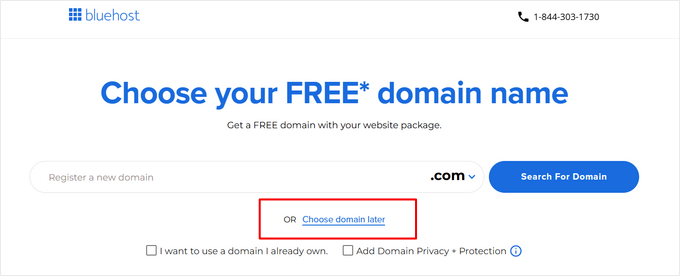
When prompted about domain selection during initial setup, choosing the option to configure your domain later provides flexibility. This approach allows complete migration before redirecting your domain to the new WordPress installation.
Following account creation and payment completion, your hosting provider will typically send welcome correspondence containing essential login credentials. Preserving this information ensures uninterrupted access to your hosting account.
Many quality hosting providers include automated WordPress installation as part of their service. This streamlined approach significantly simplifies the initial setup process for new users.
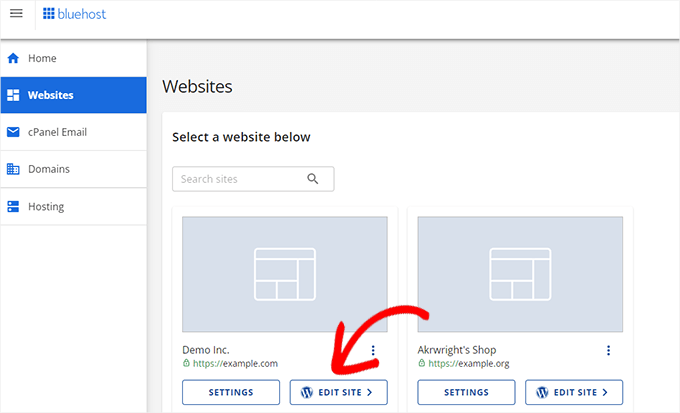
Upon accessing your hosting account dashboard, navigation to website management sections typically reveals options to access your newly installed WordPress environment. This grants immediate entry to your WordPress administrative interface.

Step 2. Export Your HubSpot Blog Content
Before initiating any changes within your HubSpot environment, the initial action involves exporting your essential content. This exported material will subsequently be imported into your new WordPress installation.
Additionally, documenting your existing URL structure proves valuable for maintaining proper redirects later in the process.
Exporting Your HubSpot Blog Content
The content export represents perhaps the most crucial step in your WordPress migration. Fortunately, HubSpot provides relatively straightforward mechanisms for exporting blog content in formats compatible with WordPress import tools.
Access your HubSpot account and navigate to your blog content through the appropriate menu paths, typically found under content management sections.
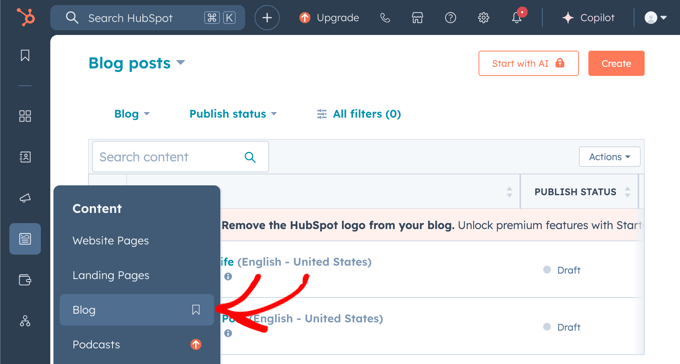
Locate export functionality within action menus or settings panels. These options typically allow exporting posts as CSV or Excel formatted files. The CSV format generally offers optimal compatibility with WordPress import tools.


