Essential Guide: How to Verify Your Domain Expiration Date and Prevent Downtime
Few experiences are as unsettling for a website owner as entering your domain name only to discover it has gone offline. This scenario occurs more often than you might think, leaving businesses without their primary web presence, email functionality, and digital identity.
Allowing a domain registration to lapse is a common oversight, but one with potentially severe consequences. Fortunately, monitoring your renewal date and avoiding this situation is straightforward with the right knowledge.
Many WordPress experts and experienced developers manage numerous domains and have established reliable systems to keep them active. This article outlines the precise techniques used by professionals to track expiration dates, ensuring your website remains accessible.
The Importance of Monitoring Your Domain Expiration
Have you ever experienced that sudden anxiety when attempting to visit your own website, only to find it unavailable?
Consider a situation where you launch a new online initiative. You configure a simple site on a previously registered domain, and everything appears ready. Weeks later, the site becomes inaccessible.
In many cases, the excitement of launching overshadowed the critical task of noting the domain's renewal deadline.
What occurs when a domain name expires?
Your website effectively vanishes from the internet. This interruption can be financially damaging. Industry research indicates that the average expense associated with website downtime is approximately $5,600 per minute.
Visitors will encounter error messages such as 'This site can’t be reached,' or potentially see advertisement-filled pages placed by other parties.
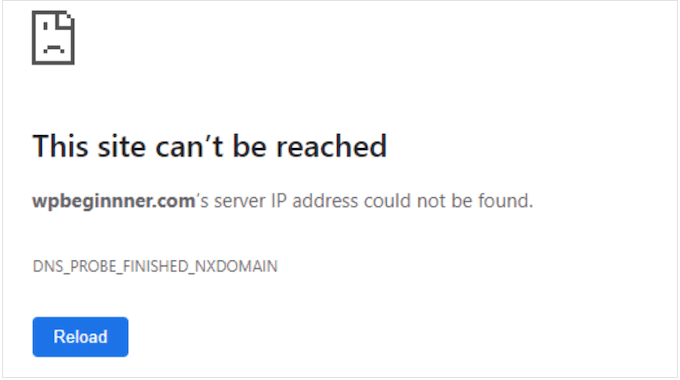
Additionally, all email accounts associated with the domain will cease functioning. This disruption can result in missed communications from clients, customers, or partners.
The impact extends beyond your site and email. Your domain represents your online brand identity, and losing it can harm your reputation and credibility.
Is It Possible to Regain an Expired Domain?
In some instances, recovering an expired domain is feasible, but it is not guaranteed and often involves complexity and additional costs.
Typically, after expiration, a domain enters a grace period lasting several weeks. During this time, you generally retain the first right to renew it, usually at the standard renewal rate.
If you miss the grace period, the situation becomes more challenging. The domain may transition into a redemption phase. This subsequent period might still allow recovery, but you will likely incur a substantial redemption fee from the registrar (often exceeding $100) in addition to the regular renewal charge.
Remember that while this process is standard for common domains like .com and .org, certain country-specific domains may follow different protocols. Always verify your registrar's specific policies.
If the redemption period also passes, your domain will eventually be released and become available for public registration. This means competitors, domain investors, or any individual could purchase it.
Proactive management is invariably preferable to reactive recovery. Regularly verifying your domain expiration date and configuring renewals is significantly less stressful than attempting to reclaim an expired domain.
Now, let's explore the most effective methods for checking your domain name expiration date:
- Using Your Domain Registrar’s Account Page
- Using WHOIS Lookup Services
- Setting Up Domain Name Expiry Notifications
- Enabling Auto Renewals So Your Domain Doesn’t Expire
- FAQ About Checking Domain Expiration Dates
- Additional Resources & Next Steps
1. Using Your Domain Registrar’s Account Page
If you need to determine when your domain name expires, your domain registrar's account dashboard should be your initial point of reference. This method is fast, straightforward, and provides comprehensive information.
Your domain registrar is the service through which you originally registered your domain name, such as Bluehost, GoDaddy, Namecheap, or similar providers.
Most registrars design their interfaces to make locating your domain expiration date simple within the account dashboard. Begin by visiting your registrar's website and logging into your account.
After logging in, navigate to sections labeled 'Domain Management,' 'My Domains,' or comparable terms. This area displays a list of all domains registered under your account.
The expiration date is typically shown adjacent to each domain or becomes visible when you select a specific domain for management. Often, this information is presented directly on the primary domain overview screen.
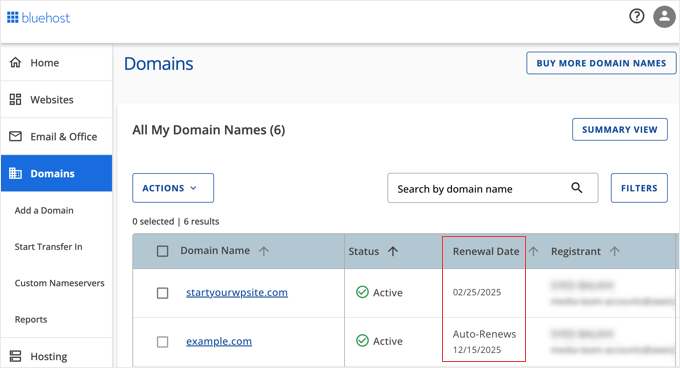
An additional advantage is that renewal options are usually located near the expiration date information.
2. Using WHOIS Lookup Services
WHOIS functions as a comprehensive, publicly accessible directory for domain names. Its database contains details about domain registrants, registration dates, and crucially, expiration dates.
Numerous websites provide WHOIS lookup capabilities. Here are several reliable options:
- ICANN Lookup (the official tool from the global domain management organization)
- DomainTools
- Whois.com
Utilizing these services is generally uncomplicated. You will typically find a search bar on the homepage. Enter the domain name you wish to check—for example, 'example.com'—and press enter or click the 'Search' or 'Lookup' button.

The WHOIS service then retrieves the domain information and presents it to you.
As you review the results, locate the entry for 'Registry Expiry Date' or 'Expires On.' This is the date you need.
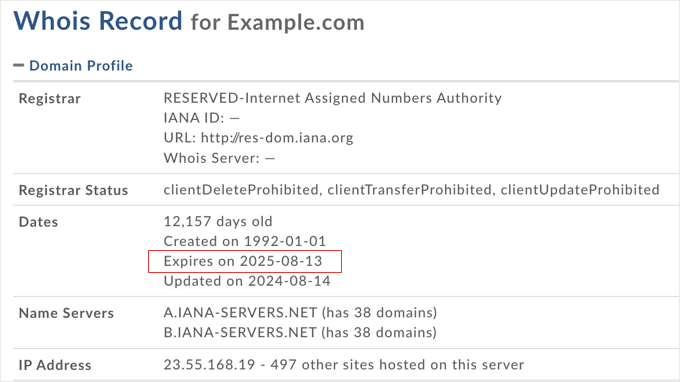
WHOIS lookup services, particularly ICANN Lookup, are highly convenient for quick verifications. This is especially useful when you only need the expiry date and prefer not to log into any accounts.
Note: WHOIS Privacy Considerations
A brief note regarding privacy. You may be familiar with WHOIS privacy or domain privacy services.
Many individuals utilize privacy services to shield their personal information from public display in the WHOIS database.
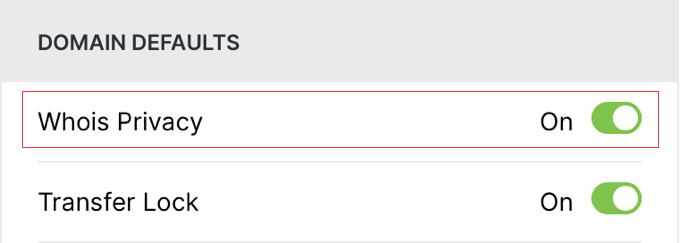
When a domain owner employs privacy services, certain contact details in the WHOIS record may be obscured or replaced with generic information.
However, the expiration date remains almost always publicly visible or easily accessible within the WHOIS output.
Therefore, even with privacy services active, WHOIS and especially ICANN Lookup continue to be dependable sources for checking domain expiration dates.
3. Setting Up Domain Name Expiry Notifications
We have covered how to check your domain expiration date. But how can you ensure you never overlook it? This is where domain expiry notifications become invaluable.
They function as a safety mechanism for your online assets. The challenge is that domain renewals are easy to forget, particularly if you manage multiple domains or registered them long ago.
Expiry notifications serve as your preventive measure. They act as digital reminders, prompting you to take necessary action before deadlines pass.
Configuring Domain Expiry Notifications With Your Registrar
Where should you establish these notifications? The most effective and direct location is typically with your domain registrar. Most providers include built-in notification systems.
For instance, Bluehost automatically sends domain expiration notifications by default. They typically email at least two reminders within 60 days prior to expiration, followed by a final reminder approximately 5 days before the date.
Some registrars offer customization options for these notifications. You might adjust the notification frequency to receive emails 60 days, 30 days, or 7 days before expiration.
You may also specify which email addresses receive these alerts. This is particularly useful for team-based management or when multiple stakeholders need awareness.



