Essential Guide to Monitoring Domain Expiration Dates and Preventing Website Downtime
There's a distinct sense of dread that emerges when you enter your website address only to discover it has disappeared entirely. This scenario has affected numerous business owners who unexpectedly lose their online presence, email functionality, and digital identity without warning.
Allowing a domain name to lapse is a common oversight, but one that carries significant consequences. Fortunately, verifying your domain's expiration date and preventing such disruptions becomes straightforward with the right knowledge.
Many WordPress experts who manage multiple domains have developed reliable systems for maintaining their security. This comprehensive guide outlines proven methods for tracking renewal dates, ensuring your website remains consistently accessible.
Understanding the Importance of Domain Expiration Monitoring
Have you experienced that unsettling moment when attempting to visit your website, only to find it completely inaccessible?
Consider a scenario where you're launching a new project. After establishing a landing page on a previously registered domain, you prepare for launch. Several weeks later, the website becomes unavailable.
This often occurs because the domain renewal date was overlooked during the initial excitement of project development.
What occurs when a domain name reaches its expiration?
Your website essentially vanishes from the internet. This interruption can prove financially damaging. Industry research indicates that average website downtime costs approximately $5,600 per minute.
Visitors will encounter error messages stating the site cannot be reached, or potentially view pages containing advertisements placed by other parties.
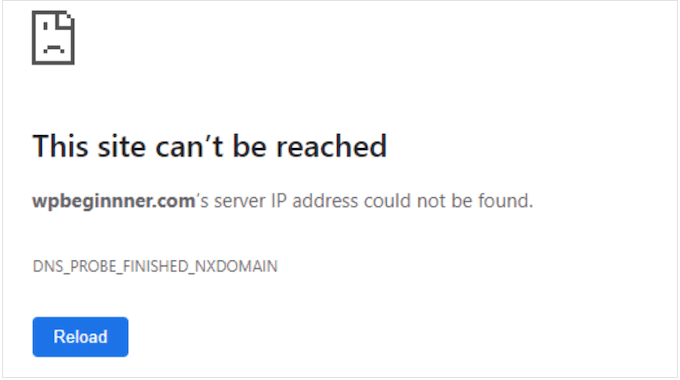
Additionally, email addresses associated with the domain will cease functioning. This disruption can result in missed communications from clients or customers.
The impact extends beyond website and email functionality. Your domain represents your digital identity, and losing it can harm brand reputation and credibility.
Is It Possible to Recover an Expired Domain?
In certain circumstances, expired domains can be recovered. However, this process isn't guaranteed and often involves complexity and additional expenses.
Typically, after expiration, domains enter a grace period lasting several weeks. During this timeframe, you generally maintain priority renewal rights at standard renewal rates.
Missing this grace period introduces complications. The domain may transition to a redemption phase, where recovery remains possible but typically requires substantial redemption fees from the registrar, frequently exceeding $100, in addition to standard renewal costs.
While this process applies to common domains like .com and .org, country-specific domains may follow different protocols. Always verify specific policies with your registrar.
If the redemption period passes, your domain eventually becomes publicly available for registration. This creates opportunities for competitors, domain investors, or other parties to acquire it.
Proactive prevention consistently proves more effective than reactive recovery. Regularly monitoring expiration dates and configuring renewals significantly reduces stress compared to attempting to reclaim expired domains.
Now, let's explore the most effective methods for checking your domain name expiration date:
- Accessing Your Domain Registrar's Account Interface
- Utilizing WHOIS Lookup Services
- Configuring Domain Expiration Notifications
- Implementing Automatic Renewal Systems
- Frequently Asked Questions Regarding Domain Expiration
- Further Resources and Recommended Actions
1. Accessing Your Domain Registrar's Account Interface
When determining your domain's expiration timeline, your registrar's account dashboard serves as the primary resource. This approach provides immediate access to comprehensive information with minimal effort.
Your domain registrar represents the service where you originally registered your domain, such as Network Solutions, Bluehost, GoDaddy, or Namecheap.
Most registrars design their interfaces to prominently display expiration information within account dashboards. Begin by visiting your registrar's website and authenticating your account.
After logging in, locate sections labeled 'Domain Management,' 'My Domains,' or similar terminology. This area typically displays all domains registered through that service.
Expiration dates appear clearly alongside each domain entry or within detailed management views for specific domains. Often, this information appears directly on the primary domain overview page.
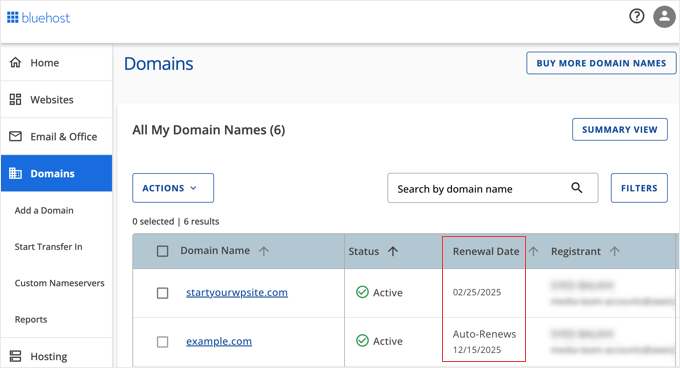
Additionally, renewal options typically appear adjacent to expiration dates, facilitating immediate action when necessary.
2. Utilizing WHOIS Lookup Services
WHOIS functions as a comprehensive public directory for domain registration information. This database contains details regarding domain registrants, registration dates, and crucially, expiration timelines.
Numerous online platforms provide WHOIS lookup capabilities. Several reliable options include:
- ICANN Lookup (the official tool from the global domain management organization)
- DomainTools
- Whois.com
These services typically feature straightforward interfaces. Locate the search field on the homepage, enter the target domain name (such as 'example.com'), then initiate the search.

The WHOIS service retrieves and displays relevant domain information.
Within the results, identify entries labeled 'Registry Expiry Date' or 'Expires On.' This represents the critical date requiring attention.
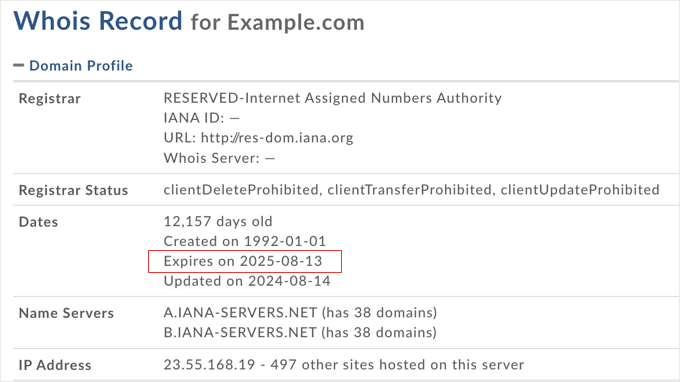
WHOIS lookup services, particularly ICANN Lookup, provide exceptional convenience for rapid verification. This proves especially valuable when requiring expiration information without accessing account credentials.
Important Consideration: WHOIS Privacy Services
A brief note regarding privacy protection: Many domain owners utilize privacy services to shield personal information from public WHOIS database exposure.
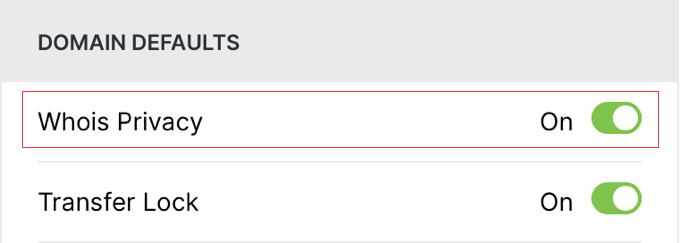
When privacy services are active, certain contact details within WHOIS records may appear masked or replaced with generic information.
However, expiration dates generally remain publicly visible or easily identifiable within WHOIS outputs.
Therefore, even with privacy protections enabled, WHOIS services, especially ICANN Lookup, maintain reliability for expiration date verification.
3. Configuring Domain Expiration Notifications
Having explored methods for checking expiration dates, let's examine proactive approaches to ensure you never miss critical deadlines. Domain expiration notifications function as essential safeguards for digital presence maintenance.
These notifications serve as protective measures against online disruptions. Domain renewals frequently become overlooked, particularly when managing multiple domains or those registered years previously.
Expiration notifications provide defensive mechanisms against such oversights. They function as digital reminders, prompting necessary actions before deadlines pass.
Establishing Domain Expiration Notifications Through Your Registrar
Where should you configure these notification systems? The most direct approach typically involves your domain registrar's platform, as most include built-in notification capabilities.
For instance, Bluehost automatically sends domain expiration notifications by default. Their system typically emails at least two reminders within 60 days preceding expiration, with final notifications approximately five days before the deadline.
Some registrars offer notification customization options. You might adjust frequency settings to receive reminders at 60-day, 30-day, or 7-day intervals before expiration.
Notification email address specification may also be available. This proves particularly valuable for ensuring multiple responsible parties receive critical reminders.


