Implementing n8n-Style Automation in WordPress: A Simplified Approach
By WordPress Expert |
Streamlining operations on your WordPress site doesn't need to be complex. While automation platforms like n8n offer robust capabilities, they often demand additional infrastructure, webhook configuration, and considerable technical expertise.
This complexity can deter beginners from even starting. Fortunately, there are plugin-based solutions that can automate numerous common WordPress functions effectively.
This guide demonstrates how to implement automation similar to n8n within WordPress using Uncanny Automator. You'll learn to connect various plugins seamlessly, initiate actions based on user interactions, and even construct AI-enhanced workflows—all without writing any code.
By the conclusion, you'll possess the knowledge to automate routine WordPress processes through methods that are more accessible, cost-effective, and suitable for users of all skill levels.
Here's a brief summary of the topics covered in this guide:
- Understanding n8n
- Limitations of n8n for WordPress Users
- Advantages of Uncanny Automator Over n8n
- Utilizing Uncanny Automator for WordPress Workflows
- Practical WordPress Automation Applications: Capabilities Beyond n8n
- Frequently Asked Questions: Uncanny Automator vs. n8n
Understanding n8n
n8n is an open-source automation platform that enables connections between various applications and services to streamline tasks.
Rather than coding, you create workflows using a visual, node-based interface. Each node represents a specific step, such as receiving information, processing it, or transmitting it to another application. This approach facilitates the development of sophisticated, multi-stage automations.
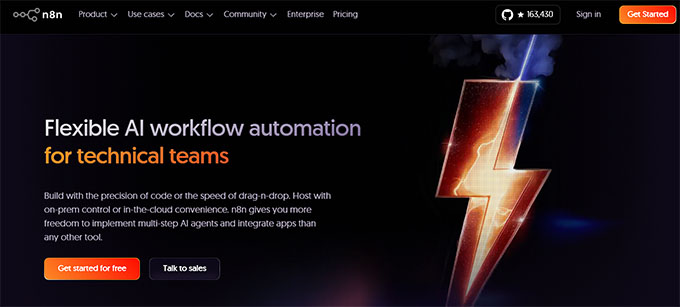
Based on multiple evaluations, n8n proves to be a reliable tool. Once you grasp its operational principles, it functions smoothly and offers substantial flexibility.
Common applications of n8n include:
- Synchronizing data across different tools and platforms
- Managing webhook-based events
- Developing multi-step automation workflows spanning multiple applications
This degree of adaptability benefits advanced configurations. However, for numerous WordPress users, it may exceed their actual requirements—particularly for routine automation needs.
Limitations of n8n for WordPress Users
While n8n is powerful, it wasn't specifically designed for WordPress. Even basic automation tasks can appear complex and confusing without development expertise.
Primary challenges for WordPress users include:
- Absence of Native Plugin Integration: Beginners often struggle to locate and connect appropriate APIs for each tool they wish to automate, consuming considerable time.
- Complex Data Mapping: WordPress frequently transmits data in formats that n8n doesn't immediately interpret, necessitating additional effort to translate and map fields accurately.
- Limited WordPress-Specific Triggers: Tracking events like user role modifications, post status updates, or plugin actions such as WooCommerce orders—common WordPress tasks—proves challenging.
- Additional Setup and Maintenance: Managing servers, maintaining updates, and securing webhooks demands significant time and technical knowledge, which can frustrate users seeking straightforward automation solutions.
These obstacles can complicate automation unnecessarily. To better understand the concealed expenses and additional effort involved, review the dropdown below.
Three Concealed Costs of Implementing n8n for WordPress
Automating WordPress with n8n might seem straightforward initially, but there are hidden expenses and time commitments that beginners frequently overlook.
Here's a concise breakdown of the main challenges:
| Hidden Cost | Explanation | Typical Cost / Time |
|---|---|---|
| Infrastructure Expenses | Requires a Private Server (VPS) or self-managed hosting for n8n operation, plus domain and SSL certificate. | VPS hosting: $12–24/month n8n.cloud: begins at $20/month for 2,500 workflow executions |
| Time Commitment | Establishing workflows, testing them, and monthly maintenance consumes considerable time and effort. | Initial setup: 4–8 hours Monthly maintenance: 2–4 hours |
| Learning Requirements | n8n necessitates understanding webhooks, JSON mapping, and error management. | Approximately 10–20 hours to achieve proper functionality |
Ultimately, developing even a simple n8n workflow for WordPress often proves more intricate and time-intensive than most users anticipate.
Advantages of Uncanny Automator Over n8n
For powerful WordPress automation without technical complications, Uncanny Automator presents an optimal solution.
Comparative testing reveals that while n8n offers substantial power, it carries a steep learning curve.
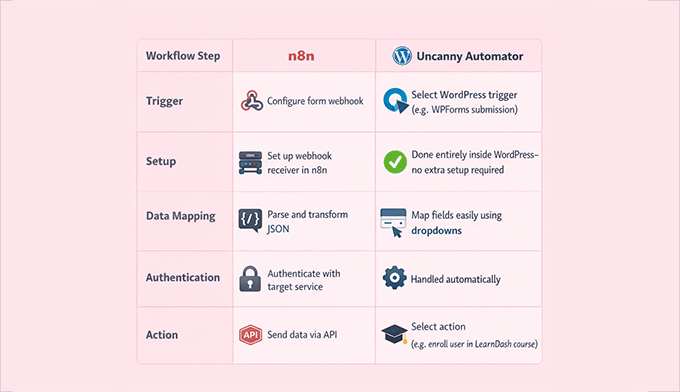
Implementing n8n requires configuring webhooks, managing APIs, parsing JSON, and handling authentication—processes that can consume hours for basic workflows.
Conversely, Uncanny Automator significantly simplifies these procedures. External servers, webhooks, and complex technical setups become unnecessary.
All operations occur directly within WordPress, enabling plugin connections and action triggers without coding.
Below is a brief comparison of typical workflows in n8n versus Uncanny Automator:
Despite this simplicity, Uncanny Automator remains remarkably powerful. You can automate complex workflows, integrate numerous plugins including WooCommerce, LearnDash, WPForms, MemberPress, BuddyPress, and others.
Additionally, you can manage multiple triggers and actions within single workflows. This allows focus on desired outcomes rather than underlying technical mechanics.
This combination of user-friendliness and capability makes Uncanny Automator transformative for WordPress users compared to n8n.
Cost Analysis: n8n vs Uncanny Automator
Regarding automation, expenses encompass not only financial outlays but also time and effort investments.
Here's how n8n compares with Uncanny Automator:
| Cost Factor | n8n | Uncanny Automator |
|---|---|---|
| Setup Expenses & Time | 4–8 hours for webhook, server, API, and authentication configuration | Minutes to select triggers and actions within WordPress |
| Ongoing Maintenance | 2–4 hours monthly for server updates, workflow monitoring, and troubleshooting (approximately $100–200/month value) | Minimal—operates on existing WordPress hosting without additional maintenance |
| Hosting / Infrastructure | VPS hosting $12–24/month or n8n.cloud subscription starting at $20/month | Utilizes existing WordPress hosting (+ starting at $199 annually for plugin license) |
| Per-Task / Execution Limits | n8n.cloud imposes usage restrictions based on workflow executions | Unlimited automations on your site (external APIs like OpenAI may charge usage fees) |
| Learning Requirements | 10–20 hours to comprehend webhooks, JSON mapping, and error handling | Nearly zero—plain-language triggers, dropdown mapping, visual recipe builder |
Key Insight: For active WordPress sites, Uncanny Automator provides predictable, flat pricing and eliminates hidden costs associated with hosting, maintenance, and technical configuration, while delivering necessary power for complex automation.
When Does n8n Represent a Superior Choice?
Transparency is essential—no single tool suits every scenario.
While Uncanny Automator addresses nearly all WordPress workflows without coding, certain situations demand advanced flexibility, complex data management, or integration across multiple platforms.
Understanding these limitations facilitates appropriate tool selection.
In professional opinion, n8n may prove preferable for:
- Automating between multiple non-WordPress systems, such as synchronizing CRMs, SaaS platforms, or databases.
- Complex data transformations, including regex, JSON parsing, or custom logic not natively handled by WordPress plugins.
- Employing a unified automation platform for complete technology stacks, particularly when workflows span multiple applications.
- Workflows requiring extensive custom code execution where visual dropdowns cannot meet all requirements.
A hybrid approach often benefits WordPress site owners. You can implement Automator for internal WordPress workflows while connecting to n8n for external system integrations via Automator webhooks.
This strategy enables simple, code-free automation within WordPress while leveraging n8n's capabilities for complex tasks.
Utilizing Uncanny Automator for WordPress Workflows
Uncanny Automator extends beyond basic tasks—it can automate diverse workflows directly within WordPress.
For instance, you can:
- Automatically record WooCommerce transactions in Google Sheets.
- Generate content automatically from form submissions using OpenAI.
- Establish new user accounts following purchases or form submissions.
- Analyze WooCommerce reviews or blog comments with AI to detect sentiment and automate responses.