Resolving the 'Cookies Are Blocked Due to Unexpected Output' Error in WordPress
Many WordPress administrators encounter the 'Cookies are blocked due to unexpected output' error while managing their websites.
This frequent problem can prevent access to the WordPress dashboard, often occurring after minor adjustments such as theme modifications or plugin activation. Identifying the root cause can be challenging, but systematic troubleshooting typically resolves the issue.
This guide provides practical methods to address this error, helping you restore normal site functionality efficiently.
This tutorial covers the following areas:
- Understanding the 'Cookies Are Blocked Due to Unexpected Output' Error
- Methods to Fix the 'Cookies Are Blocked Due to Unexpected Output' Error
- Inspect PHP Files for Extra Whitespace
- Temporarily Deactivate All Plugins
- Change to a Default WordPress Theme
- Utilize WP_DEBUG Mode for Troubleshooting
- Preventative Measures for Future Errors
- Additional Resources for WordPress Error Resolution
Understanding the 'Cookies Are Blocked Due to Unexpected Output' Error
The 'Cookies are blocked due to an unexpected output' error typically appears when custom code, WordPress plugins, or themes generate output that disrupts WordPress's normal loading sequence.
WordPress executes specific background processes to maintain site functionality. Interruptions to these processes can cause unexpected behavior.
In this scenario, the error occurs because WordPress fails to establish the login cookie while other code components load normally.
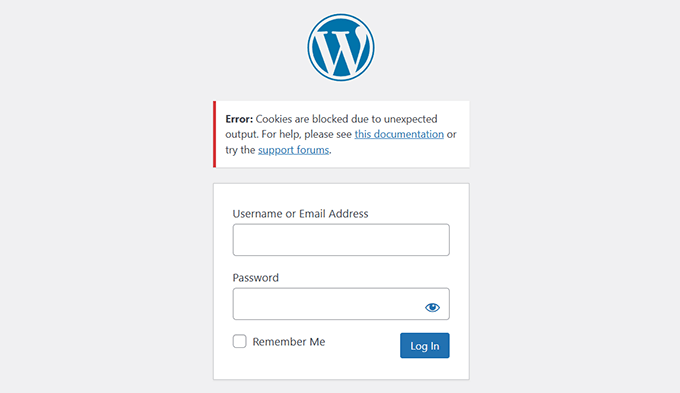
This seemingly minor issue can create significant access problems, potentially blocking administrators and users from logging into the WordPress site.
Common causes observed by experienced developers include:
- Unnecessary Whitespace in PHP Files: Unintended spaces or blank lines in files such as wp-config.php or plugin files can trigger this issue.
- Plugin Compatibility Problems: Occasionally, plugins may produce unexpected content that interferes with cookie functionality.
- Outdated WordPress Components: Running older versions of WordPress core, plugins, or themes can lead to compatibility issues and errors.
- Custom Code Implementation: Recently added custom code might be responsible for the error.
- Server Configuration Issues: In some instances, server misconfigurations can contribute to the problem.
Understanding these potential causes provides a foundation for systematic troubleshooting, which we'll explore in detail.
Methods to Fix the 'Cookies Are Blocked Due to Unexpected Output' Error
Addressing this error may appear complex initially, but practical solutions exist for each potential cause.
We'll guide you through straightforward steps to identify and resolve the issue, based on common scenarios encountered by WordPress professionals.
Whether the problem stems from coding errors, problematic plugins, or outdated themes, you'll find applicable solutions here.
Let's begin with the most frequent cause.
1. Inspect PHP Files for Extra Whitespace
Excess whitespace in WordPress files represents a common source of this error. These spaces may appear before the opening <?php tag or after the closing ?> tag in PHP files. Even a single blank line can create problems.
Follow these steps to address this issue.
First, access your website files using an FTP client or the File Manager tool in your hosting control panel.
Once connected, locate the wp-config.php file, which frequently contains problematic whitespace.
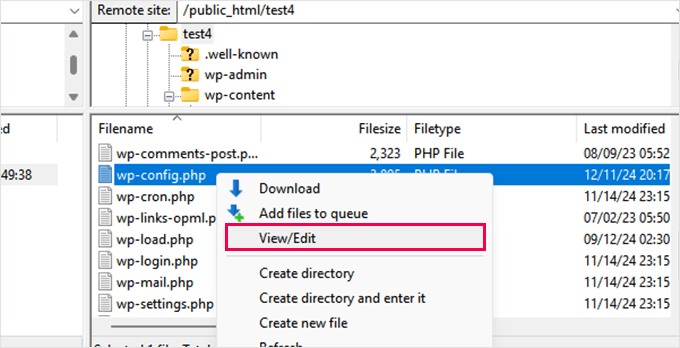
Search for blank lines or spaces before the <?php or after the ?> tags. Remove any unnecessary spaces you discover.
Save your modifications and upload the file back to your server.
Test your website to determine if this resolves the error.
If the error persists, repeat this process for other commonly edited WordPress files, such as your theme's functions.php file, particularly if you've recently modified or updated your WordPress theme.
Eliminating unnecessary spaces before PHP code often resolves the issue.
However, typical WordPress installations contain numerous PHP files within plugins and themes. Manually checking all files isn't practical.
The following steps will help identify whether plugins or themes are causing the error.
2. Temporarily Deactivate All Plugins
Plugin conflicts sometimes generate unexpected output in WordPress, resulting in the 'Cookies are blocked due to unexpected output' error. Temporarily disabling all plugins provides a quick method to identify problematic components.
If you can access the dashboard, navigate to the Plugins » Installed Plugins page.
Select all plugins, choose 'Deactivate' from the bulk actions dropdown, and click 'Apply'.
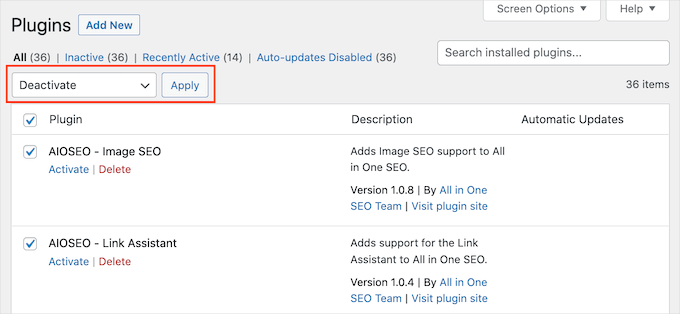
Attempt to log in or refresh the page to see if the error disappears.
If you cannot access the WordPress admin area, deactivate plugins using an FTP client.
Connect to your WordPress website using an FTP client or the File Manager application in your web hosting control panel.
Navigate to the wp-content folder once connected.
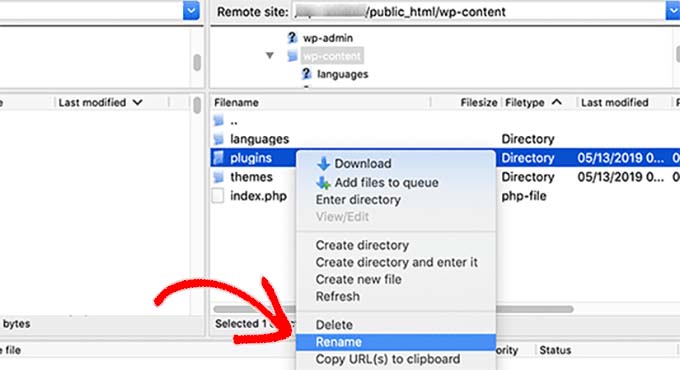
Inside the wp-content folder, locate the plugins folder. Right-click on it and select the 'Rename' option.
Change the plugins folder name to any alternative name. For example, you might rename it 'plugins.deactivated'.
WordPress requires the plugins folder to load activated plugins. When this folder is unavailable, WordPress cannot activate plugins and automatically marks them as deactivated.
If the error resolves after deactivating all plugins, one of your plugins likely caused the problem.
Reactivate plugins individually to identify the specific plugin triggering the error. Once identified, you can deactivate it permanently or contact the plugin developer for assistance.
3. Change to a Default WordPress Theme
Your WordPress theme might also cause the 'Cookies are blocked due to unexpected output' error. Theme conflicts can arise from outdated code or unexpected output from customizations.
To eliminate theme-related issues, switch to a default WordPress theme such as Twenty Twenty-Five or Twenty Twenty-Four:
If you have WordPress admin access, navigate to the Appearance » Themes page.
Check whether you have a default theme installed. Default themes typically carry year-based names like Twenty-Five or Twenty-Four.


