Two Effective Methods for Building Multilingual Forms in WordPress
Creating forms that speak your visitors' languages can transform how global audiences interact with your website. While many site owners focus on translating pages and posts, forms often remain overlooked—yet they're critical touchpoints for conversions and engagement.
Multilingual forms do more than just translate text. They create a seamless, comfortable experience that respects users' language preferences. When visitors can complete forms in their native language, they're more likely to engage fully and follow through with submissions.
After extensive testing, two reliable approaches have emerged for creating multilingual forms in WordPress. The first method emphasizes simplicity and automation, while the second offers greater control for advanced needs. Both can be implemented within an hour, even by those new to multilingual setups.
Understanding Multilingual Forms and Their Benefits
Multilingual forms dynamically display content in different languages based on user preferences. These forms are essential for websites serving international audiences, ensuring every visitor can interact with your content in their preferred language.
Key advantages of implementing multilingual forms include:
- Enhanced user engagement. By removing language barriers, multilingual forms help users understand questions and instructions clearly, reducing form abandonment rates.
- Improved conversion rates. Conversion rates measure the percentage of users who complete desired actions, such as newsletter signups or purchases. When users can complete forms in their native language, the process becomes more intuitive and efficient.
- Superior user experience. Multilingual forms contribute significantly to positive user experiences by allowing visitors to interact comfortably in familiar languages.
Given these benefits, implementing multilingual forms represents a strategic move toward making your website more accessible and user-friendly for diverse audiences.
The following sections detail two proven methods for creating multilingual forms. Use the quick links below to navigate directly to your preferred approach:
- Method 1: Creating Multilingual Forms with Automated Translation
- Method 2: Creating Multilingual Forms with Manual Translation Control
Let's explore each method in detail.
Method 1: Creating Multilingual Forms with Automated Translation
The simplest approach to multilingual forms combines a popular form builder with an automated translation solution. This method leverages machine learning to translate form content automatically, eliminating manual translation work.
The recommended form builder offers a drag-and-drop interface with numerous pre-designed templates, making form creation straightforward for any skill level. Many experienced WordPress users rely on this tool for various form needs across their websites.
To translate forms created with this builder, you'll need to integrate it with a dedicated translation plugin. The recommended translation tool uses advanced algorithms to automatically translate website content, including pages, posts, and form elements.
This translation solution offers extensive language support and includes a free trial period for testing purposes.
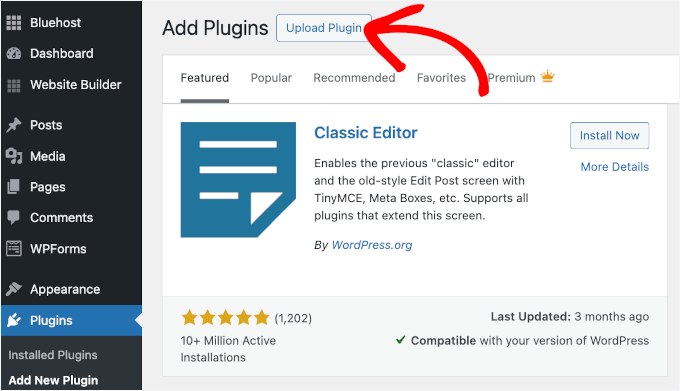
Begin by installing both plugins through your WordPress dashboard. Navigate to the plugins section and upload each plugin's ZIP file separately. If you need assistance with plugin installation, numerous online tutorials provide step-by-step guidance.
After activation, create your form using the form builder's interface. The process typically involves selecting a template, customizing fields, and configuring submission settings.
Once your form is ready, configure the translation plugin. Access the translation settings from your WordPress dashboard and locate the API key section. You'll need to create an account with the translation service to obtain your unique API key.
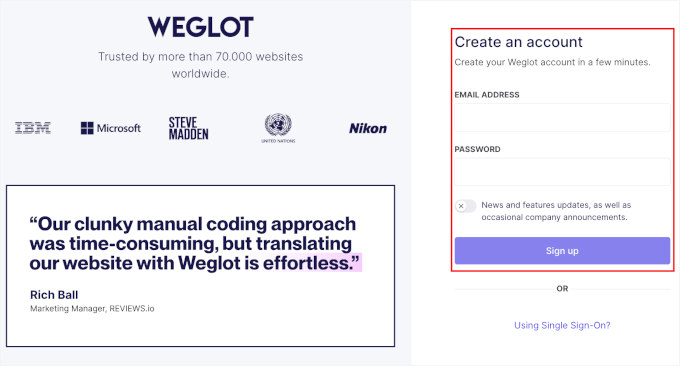
After signing up, retrieve your API key from the translation service dashboard and paste it into the corresponding field in your WordPress settings.
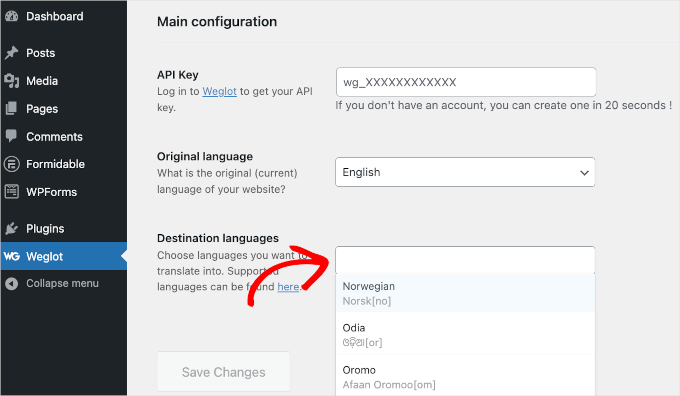
Next, select your target languages from the destination languages dropdown menu. The translation service supports over 100 languages, allowing you to choose all relevant languages for your audience.
Save your changes and wait for confirmation that your multilingual setup is active. You should receive a notification indicating successful configuration.

Visit your website's front end to test the translation functionality. A language selector should appear, typically in the bottom corner of your screen. Select a different language to see your form content translated automatically.
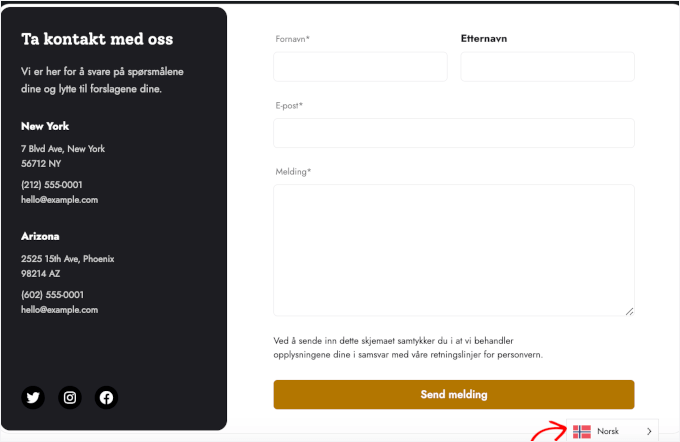
Your form is now fully multilingual, automatically displaying content in the selected language.
Method 2: Creating Multilingual Forms with Manual Translation Control
The second method for creating multilingual forms combines a different form builder with a translation add-on. This approach provides greater control over translations, allowing you to enter and manage translations manually for each language.
The recommended form builder for this method offers robust form creation capabilities. To access multilingual features, you'll need the business tier or higher of this form builder.
The translation add-on integrates with a popular multilingual plugin, enabling you to enter translations for all website content, including forms. This solution allows precise control over translations for multiple languages.
Begin by installing both the form builder and the multilingual plugin. Upload each plugin's ZIP file through your WordPress dashboard, installing them separately.


