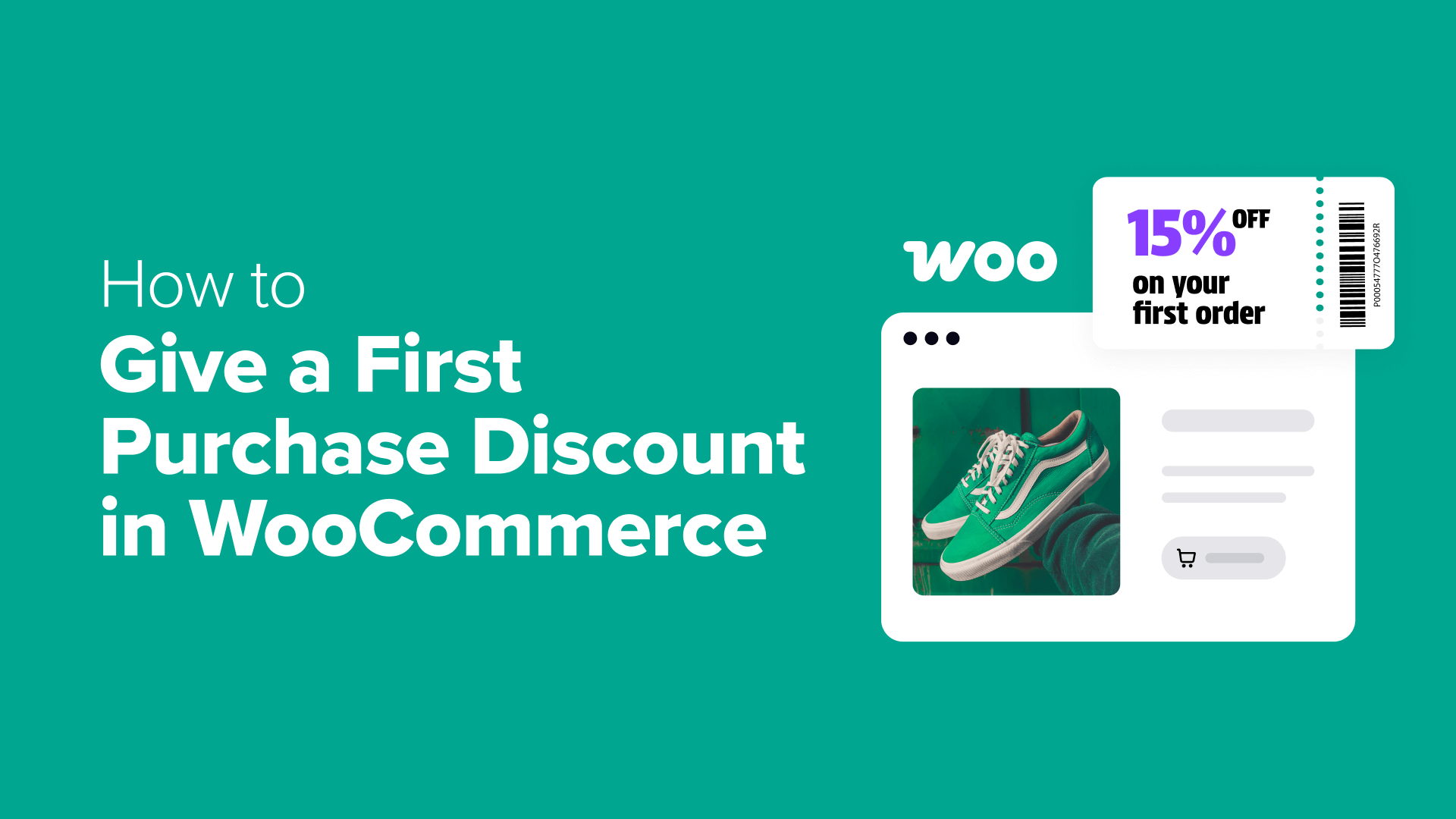
3 Effective Methods to Implement First-Time Customer Discounts in WooCommerce
Providing discounts for initial purchases represents a powerful strategy for converting website visitors into paying customers. This approach offers several advantages:
- Transform hesitant shoppers into satisfied buyers
- Develop a subscriber base of potential repeat customers
- Generate urgency that accelerates purchasing decisions
For WooCommerce store owners seeking to establish first-purchase discounts, multiple implementation approaches exist. After evaluating various solutions, three particularly effective methods have been identified.
- Method 1: Advanced Coupons (Flexible Coupon Distribution)
- Method 2: FunnelKit Automations (Lead-Based Coupon Delivery)
- Method 3: First Order Discount Plugin (Simplified Free Solution)
- Common Questions About First-Purchase Discounts
- Additional WooCommerce Optimization Strategies
Method 1: Advanced Coupons (Flexible Coupon Distribution)
For merchants seeking to create first-purchase coupon codes with versatile sharing capabilities, Advanced Coupons provides a robust solution.
This comprehensive coupon management extension eliminates the requirement for email collection prior to discount distribution. You can disseminate your coupon code across multiple channels including your website, social media platforms, email campaigns, or printed materials. Customers simply enter the provided code during checkout to receive their discount.
Step 1: Configuring Advanced Coupons
Begin by installing Advanced Coupons on your WordPress site. After downloading the necessary files, navigate to your WordPress administration panel to install and activate the extension.
Following activation, you'll need to register your license. Access Coupons » License within your dashboard.
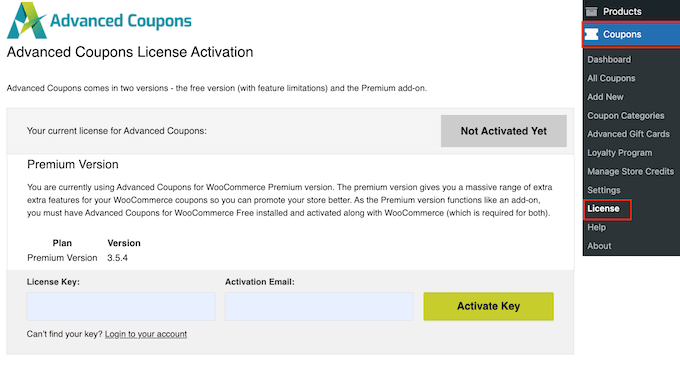
Locate your license key within your Advanced Coupons account interface. Input this key along with the email address associated with your purchase, then select 'Activate Key.'
Step 2: Developing Your First-Purchase Coupon
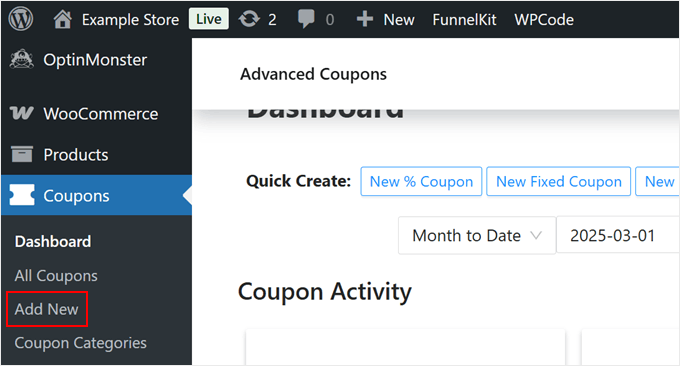
Proceed to create your automated discount coupon. Navigate to Coupons » Add New in your WordPress administration area.
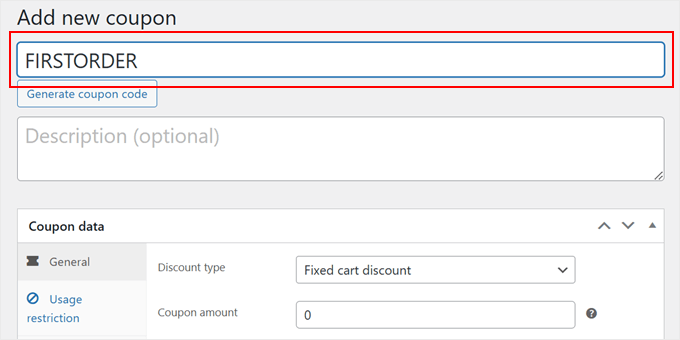
First, assign your coupon a memorable code such as 'FIRSTORDER' or 'WELCOME.' Optionally, include a descriptive explanation of the coupon's purpose.
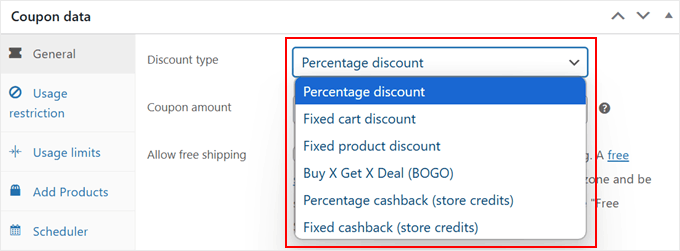
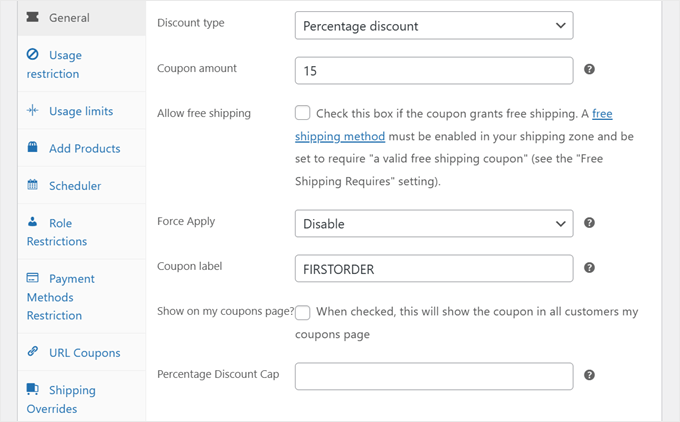
Scroll downward to the 'Coupon Data' section and open the 'General' tab. Within 'Discount Type,' multiple options appear:
- Percentage-based total purchase reduction
- Fixed amount discount (cart or product-specific)
- Percentage or fixed cashback through store credits
- Buy-one-get-one promotional offers
Select the discount type most appropriate for your business model. Many experienced merchants recommend percentage discounts for first-time buyers since they remain effective regardless of purchase value.
After choosing your discount type, specify the discount amount. You may optionally enable free shipping with the coupon and activate 'Force Apply' functionality to replace existing coupons with your first-discount coupon.
Consider establishing a percentage discount cap to limit maximum discount amounts. For instance, you could implement a 15% discount with a $30 maximum. For a $300 product, customers would receive $30 rather than $45.
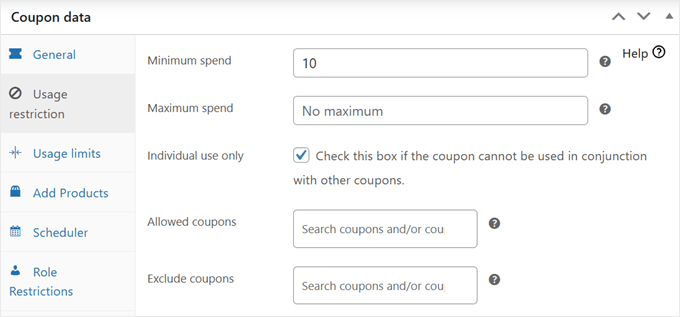
Navigate to the 'Usage Restriction' section. While numerous settings exist here, primary configurations include:
- Establishing minimum and maximum spending requirements. Minimum spend requirements can encourage customers to add additional items, potentially increasing average order value.
- Selecting applicable products for coupon usage
- Excluding specific products or categories from coupon eligibility
- Enabling individual use to prevent coupon stacking with other promotions
The final option allows specification of which coupons may combine with your first-order discount code.
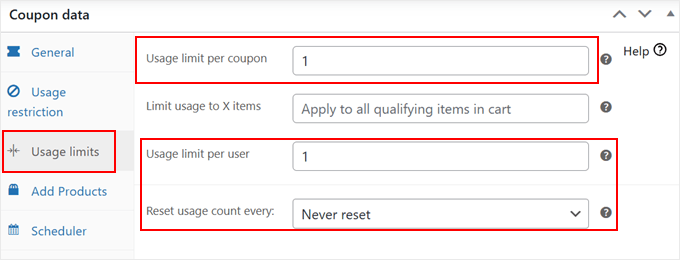
Within the 'Usage Limits' tab, configure how frequently the coupon may be utilized. Many store owners recommend setting both 'Usage limit per coupon' and 'Usage limit per user' to 1 to prevent coupon misuse. Ensure 'Reset usage count every' remains set to 'Never.'
For merchants preferring automatic coupon application via clickable links, navigate to the 'URL Coupon' tab. This functionality allows customers to activate discounts through direct link clicks without manual code entry.
Method 2: FunnelKit Automations (Lead-Based Coupon Delivery)
This approach focuses on delivering discount codes after visitors convert into leads through form submissions. FunnelKit Automations facilitates this process by connecting lead capture forms with automated coupon distribution systems.
Step 1: Beginning with FunnelKit Automations
Install and activate FunnelKit Automations within your WordPress environment. Following activation, configure the basic settings according to your store requirements.
Step 2: Integrating FunnelKit with Lead Capture Forms
Connect your existing lead generation forms with the automation platform. Most popular form builders maintain compatibility with FunnelKit through available integrations or API connections.
Step 3: Configuring Form Triggers
Establish triggers that initiate the coupon delivery sequence when visitors complete your lead capture forms. These triggers typically activate upon form submission confirmation.
Step 4: Generating Dynamic Coupons
Create dynamic coupon codes that generate uniquely for each new lead. This approach enhances security and prevents unauthorized code sharing beyond intended recipients.
Step 5: Preparing Welcome Emails
Design welcome emails containing the dynamically generated coupon codes. These communications should provide clear instructions for coupon redemption while reinforcing your brand messaging.
Step 6: Testing Email Deliverability
Conduct thorough testing to ensure emails deliver successfully to various email providers. Verify that coupon codes function correctly within the checkout process before full implementation.
Step 7: Enabling Your Automation
Activate the complete automation sequence once all components have been tested and verified. Monitor initial performance to identify any necessary adjustments.
Method 3: First Order Discount Plugin (Simplified Free Solution)
For merchants seeking straightforward implementation without extensive configuration, dedicated first-order discount plugins offer simplified solutions. These tools typically provide basic functionality for applying automatic discounts during customers' initial purchases without requiring coupon code entry.
While feature sets vary between available plugins, common capabilities include percentage or fixed-amount discounts, minimum purchase requirements, and exclusion settings for specific products or categories. Many experienced developers recommend evaluating multiple options to identify the solution best aligned with specific business requirements.
Common Questions About First-Purchase Discounts
Merchants frequently inquire about optimal discount percentages, implementation timing, and compatibility with existing promotional strategies. Research indicates that discount amounts between 10-20% typically generate positive conversion rates without significantly impacting profitability. Implementation should align with overall marketing objectives and customer acquisition strategies.
Additional WooCommerce Optimization Strategies
Beyond first-purchase discounts, numerous optimization techniques exist for enhancing WooCommerce store performance. These include cart abandonment recovery systems, personalized product recommendations, loyalty program implementations, and streamlined checkout processes. Many successful store owners implement multiple strategies simultaneously to maximize conversion rates and customer retention.