3 Effective Methods to Sell a Single Product Using WordPress
Many entrepreneurs and small business owners focus on offering a single physical or digital product. Starting an online store for one item can be straightforward, yet some individuals are unsure how to begin.
Based on extensive experience with various eCommerce solutions, the most reliable approaches involve using dedicated WordPress plugins such as WooCommerce, Easy Digital Downloads, and WP Simple Pay.
This guide will walk you through three practical methods for selling a single product online with WordPress.
Advantages of a Single-Product WordPress Store
Operating a store with one product simplifies management significantly. You won't need to track extensive inventories, update numerous product pages, or establish complex processes for handling multiple items.
Cost efficiency is another benefit. Running a single-product store typically requires fewer resources. You can start with an economical WordPress hosting plan that provides reliability for your eCommerce site.
Focusing on a single offering helps establish authority within a specific niche. This concentrated approach allows for better understanding of customer needs, continuous product improvement, and the development of targeted marketing campaigns that often yield higher conversion rates.
Below are three distinct methods for selling a single product online with WordPress. You can navigate directly to any section using the links provided.
- Method 1: Sell a Physical Product with Shipping Using WooCommerce
- Method 2: Sell a Digital Product Using Easy Digital Downloads
- Method 3: Sell a Product or Service Using WP Simple Pay
- Alternative Approach: Using WPForms for a Single Product
- Common Questions About Selling a Single Product Online
Method 1: Sell a Physical Product with Shipping Using WooCommerce
WooCommerce is a widely adopted eCommerce platform utilized by businesses of various sizes globally. Developed as a WordPress extension, it enables users to sell products and services online.
This solution is ideal for selling physical goods that require shipping. It offers extensive functionality and integrates with numerous WordPress plugins and tools.
Many users find WooCommerce accessible for beginners. To begin, you will need WordPress hosting, a domain name, and an SSL certificate.
Web hosting stores your website files and data. A domain name serves as your website address on the internet. An SSL certificate secures your site and enables safe online payment processing.
You can refer to comprehensive WooCommerce setup guides for selecting appropriate hosting and installing the platform correctly.
Here is an overview of basic steps to create a single-product store with WooCommerce.
Configuring Payment Methods in WooCommerce
After setting up WooCommerce on your WordPress site, proceed to configure payment methods.
Navigate to WooCommerce » Settings from the WordPress admin area. Select the 'Payments' tab.
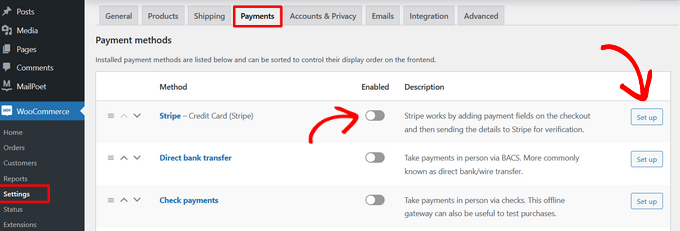
Next, configure various payment gateways to accept online payments.
Options include Stripe, PayPal, Apple Pay, Google Pay, direct bank transfers, and other methods.
Establishing Shipping Zones for Your Store
WooCommerce allows you to define shipping zones for your single-product store.
Go to WooCommerce » Settings from your dashboard and click the 'Shipping' tab.
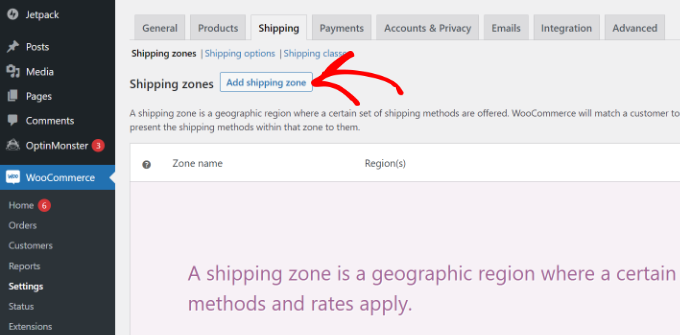
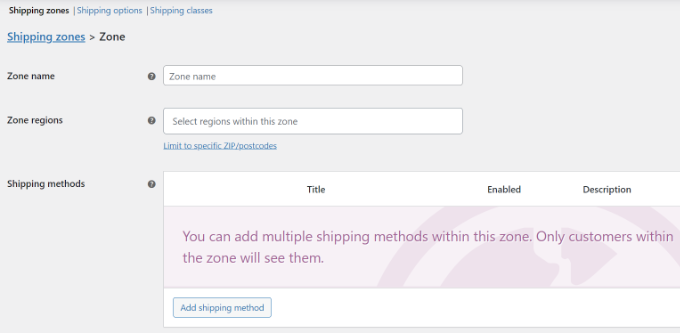
Select 'Shipping zones' under the Shipping tab. Click 'Add shipping zone'.
Enter details for the shipping zone, including a name, applicable regions, and shipping methods.
WooCommerce provides three primary shipping method types.
You can offer free shipping, set a flat rate, or enable local pickup.
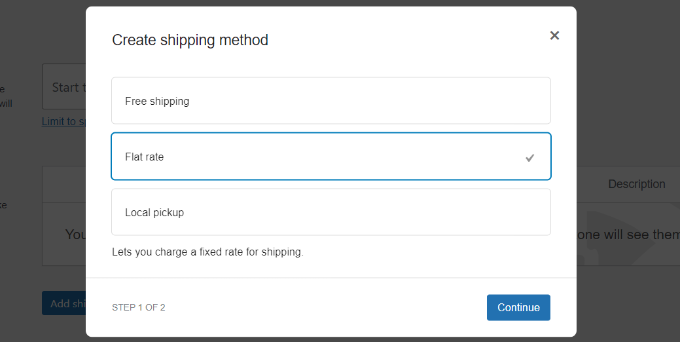
For this example, we will select the 'Flat rate' option.
Enter the necessary details and click 'Save Changes'.
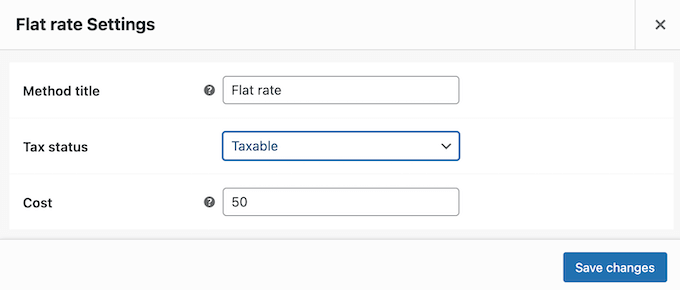
Repeat this process to add multiple shipping regions as needed.
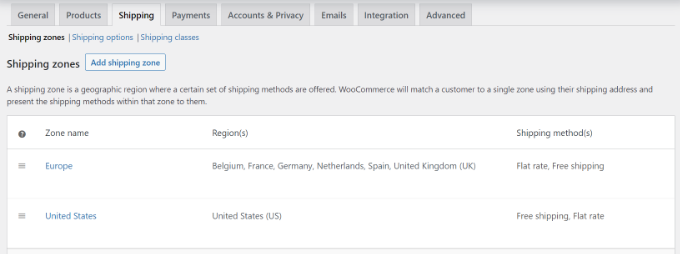
Return to the Shipping Zones page in WooCommerce settings to view details of your configured regions.
Choosing and Customizing a WooCommerce Theme
Next, select a theme for your single-product eCommerce store.
You can choose from numerous free and premium themes. To simplify selection, many experienced developers recommend curated lists of optimized WooCommerce themes.
If you need guidance, consider factors like responsiveness, customization options, and compatibility when selecting a WordPress theme.
Additionally, various WordPress page builders allow creation of custom eCommerce stores. These tools typically offer drag-and-drop editing, pre-designed templates, and WooCommerce block integration without requiring coding knowledge.