
A Comprehensive Guide to Building Effective Lead Magnets for Your Website
By Editorial Team |
Savvy entrepreneurs understand that downloadable resources such as ebooks and PDFs serve as excellent tools for capturing contact information, expanding email lists, and maintaining communication with website visitors long after they've departed.
While this concept appears straightforward, many website operators find the process of designing professional-quality lead magnets that audiences genuinely desire to download somewhat daunting.
This apprehension explains why numerous site owners opt to hire professional designers for lead magnet creation. Although this approach can yield impressive results, it may prove impractical for those operating with limited budgets or seeking to maximize their return on investment.
What if you could independently produce high-quality lead magnets without specialized design skills?
This guide presents a systematic approach to developing lead magnets that effectively convert visitors into subscribers, drawing from practical experience in creating successful lead generation materials.
We will explore various formats including ebooks, resource guides, checklists, and other downloadable content that can be created without requiring design expertise or coding knowledge.
Maximizing Your Investment: Achieving Real Returns from Lead Magnet Development
Downloadable resources including ebooks, templates, and other files establish valuable communication channels with prospective customers that extend well beyond their initial website visit.
Many WordPress users express concern about needing professional design assistance for lead magnet creation. For small business operators, hiring designers can represent significant expense before any return materializes.
Even with adequate marketing budgets, the designer engagement process requires substantial time investment for candidate selection, project briefing, review cycles, feedback implementation, and final approval—time that could otherwise be directed toward business growth activities.
This reality underscores the value of learning to create lead magnets independently. Modern lead magnet creation platforms enable users to select from pre-designed templates, add content through intuitive editors, and publish materials with minimal effort.
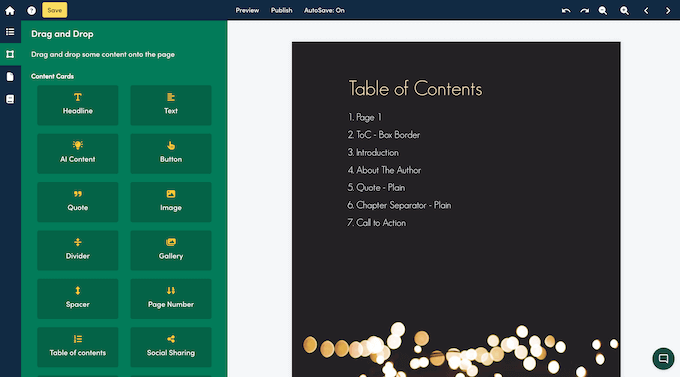
Independent creation offers additional advantages, including the ability to update content at any time. Whether revising outdated statistics, adding supplementary material, or refreshing seasonal content, you maintain complete control over modifications.
This comprehensive guide demonstrates how to develop various lead magnet types, including ebooks, checklists, video presentations, resource compilations, and additional formats.
The following sections outline our systematic approach:
- Step 1: Selecting Appropriate Lead Magnet Software
- Step 2: Determining Your Lead Magnet Format
- Step 3: Template Selection
- Step 4: Naming Your Lead Magnet
- Step 5: Customizing Template Elements
- Step 6: Removing Unnecessary Content
- Step 7: Adding Supplementary Pages
- Step 8: Incorporating Additional Content Cards
- Step 9: Publishing Your Completed Lead Magnet
- Step 10: Rapidly Developing a Lead Magnet Collection
- Additional Strategy: Enhancing Lead Generation
- Frequently Asked Questions About Lead Magnet Development
Step 1: Selecting Appropriate Lead Magnet Software
The initial phase involves choosing suitable lead magnet creation tools.
Many experienced WordPress professionals have tested numerous platforms while expanding their email lists through lead magnets. Based on extensive evaluation, certain specialized builders offer comprehensive functionality for creating diverse lead magnet types including ebooks, resource guides, checklists, templates, and video presentations.
This versatility proves particularly valuable since different audience segments respond to varied content formats. By offering multiple lead magnet options, you increase conversion opportunities across your visitor base.
Effective platforms typically feature user-friendly interfaces, extensive template libraries, and conversion capabilities for existing blog content into polished lead magnets with minimal effort.
Several platforms offer free tier options that permit regular creation of new lead magnets with unlimited distribution capabilities.
After selecting your preferred platform, establish your account and access the dashboard to begin your first lead magnet project.
Step 2: Determining Your Lead Magnet Format
Initiate the creation process by selecting the 'Create New' option typically located in the interface's upper-right section, then choose 'Lead Magnet' from available options.
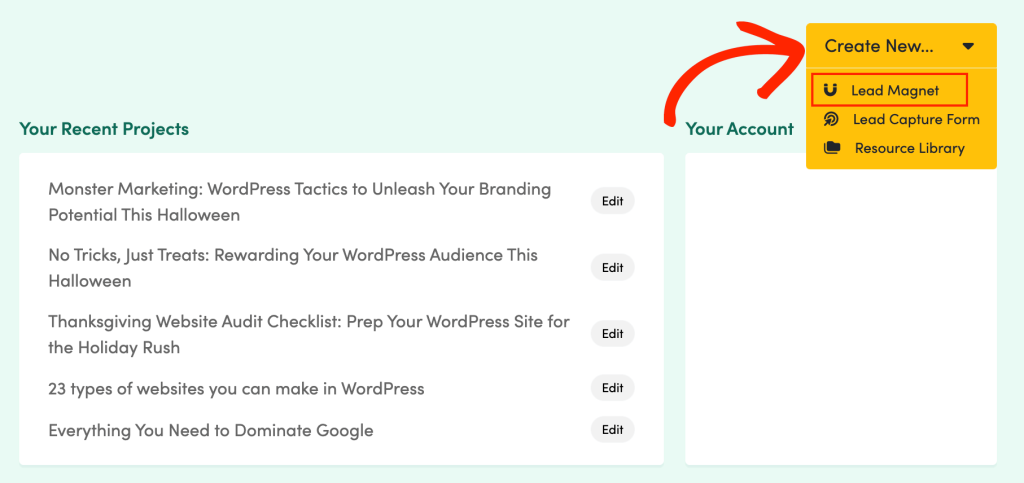
Most platforms display various lead magnet categories. Regardless of your selection, these systems typically provide multiple pre-designed templates within each category, all fully customizable through drag-and-drop editing interfaces.
This guide focuses primarily on ebook creation, though the fundamental principles apply across most lead magnet formats.
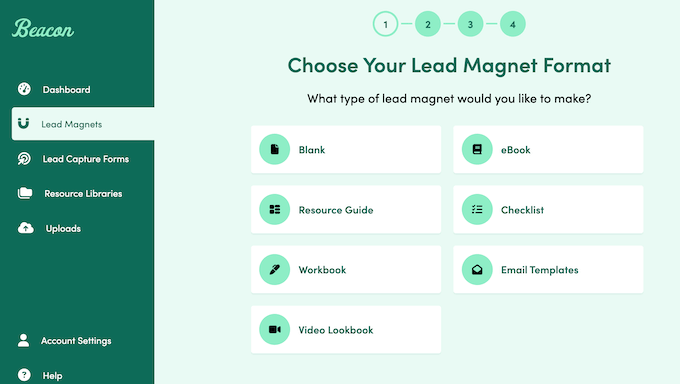
To assist with format selection appropriate for your target audience, consider these common lead magnet types available through modern creation platforms:
Workbook
Workbooks facilitate visitor engagement with specific activities through structured tasks or questions accompanied by response areas. These interactive resources often generate stronger engagement than passive content formats.

For instance, wellness professionals might develop workbooks for meal planning or exercise tracking purposes.
Video Lookbook
Video lookbooks present multimedia content in aesthetically pleasing layouts, often supplemented with textual explanations, imagery, quotations, and galleries for enhanced context.
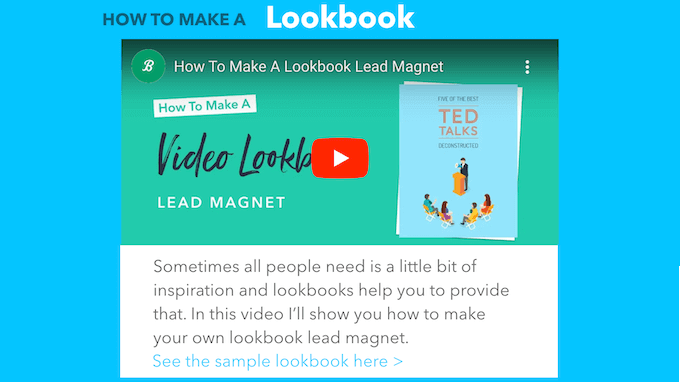
These formats work particularly well for brand aesthetic presentation, serving as digital catalogs, professional showreels, or specialized presentations aligned with specific offerings.
eBook
eBooks provide structured formats for sharing comprehensive information on specialized topics through organized chapters and sections.



