
A Practical Guide to Monitoring SEO Modifications on Your WordPress Website
By Editorial Team |
Many WordPress site owners experience a common dilemma. You invest significant time refining content and implementing search engine optimizations, yet remain uncertain whether these efforts yield tangible results.
There's also the persistent concern that recent adjustments might inadvertently harm your search rankings. Systematic monitoring of SEO performance provides the clarity needed to address these uncertainties effectively.
Numerous WordPress professionals utilize structured approaches with specialized tools to evaluate the impact of their modifications. This methodology enables them to identify successful strategies and promptly address any issues.
This comprehensive tutorial outlines a proven method for tracking SEO changes on your website. We'll begin by examining why establishing this monitoring practice is essential for long-term success.
This guide covers the following essential topics:
- The Importance of Monitoring SEO Modifications
- Monitoring SEO Changes Using Specialized Tools
- Tracking Search Engine Rankings
- Additional Performance Tracking Methods
- Common Questions About SEO Tracking
- Further Learning Opportunities
The Importance of Monitoring SEO Modifications
Creating quality content represents only one aspect of successful website management. To attract visitors through search engines like Google, you must also optimize your material for search visibility—a practice known as search engine optimization (SEO).
SEO modifications encompass any adjustments made to your content or website structure to enhance performance in search results. Examples include updating meta tags, modifying headers, incorporating relevant keywords, and improving content structure.
Without understanding how your SEO changes influence search rankings, you're essentially operating without direction. You won't know whether title tag adjustments generate more clicks or if keyword additions improve article positioning.
Furthermore, content modifications can sometimes negatively affect search performance. For instance, rewriting titles or meta descriptions for readability might inadvertently alter keyword density, potentially reducing your content's SEO effectiveness.
Other changes like URL modifications or accidental broken links can create 404 errors, damaging your site's credibility with search engines.
By systematically tracking these modifications, you can identify which SEO strategies effectively improve your search positioning. This knowledge enables you to concentrate efforts on the most productive approaches.
With this foundation established, let's explore practical methods for monitoring SEO changes within WordPress.
Monitoring SEO Changes Using Specialized Tools
The most efficient approach to tracking SEO modifications involves utilizing dedicated WordPress plugins with revision tracking capabilities. These tools typically include SEO revision features that allow you to review changes made to your content over time.
Such solutions often provide comprehensive on-page optimization tools, automated sitemap generation, and additional SEO functionality.
Professional Perspective: Why Revision Tracking Matters
Experienced WordPress developers emphasize the importance of tracking SEO modifications systematically. Many professionals have transitioned to tools offering revision tracking because these features provide valuable insights into how changes affect search performance.
Revision tracking capabilities represent a significant advancement in SEO management, allowing website owners to make data-driven decisions about their optimization strategies.
To begin, install and activate a WordPress SEO plugin with revision tracking functionality. Most quality SEO plugins include straightforward installation processes.
Once activated, navigate to any post or page where you've implemented SEO modifications. Scroll to the SEO settings section and locate the revision tracking tab.
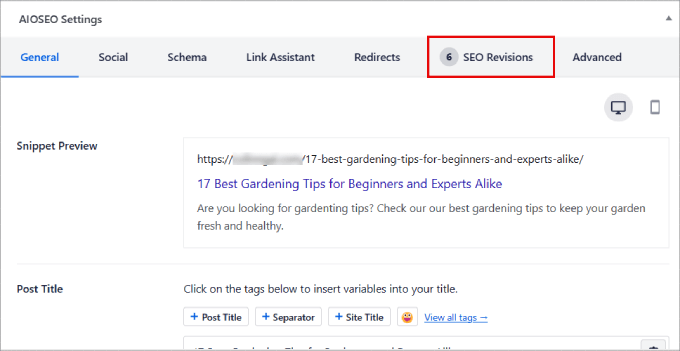
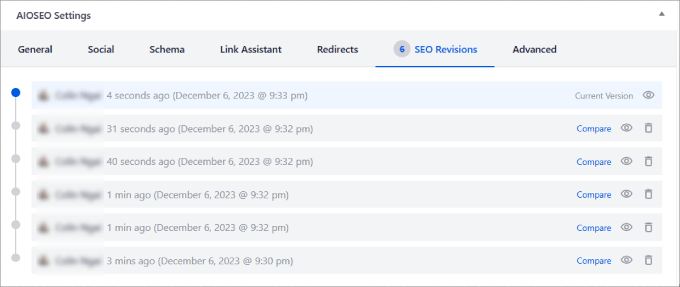
With SEO revision functionality, you can examine modifications that may have influenced search rankings. These changes typically appear in chronological order, with recent adjustments listed first.
The system usually displays the date and time for each modification. While this view doesn't show ranking data directly, you can cross-reference this information with other reports to assess impact.
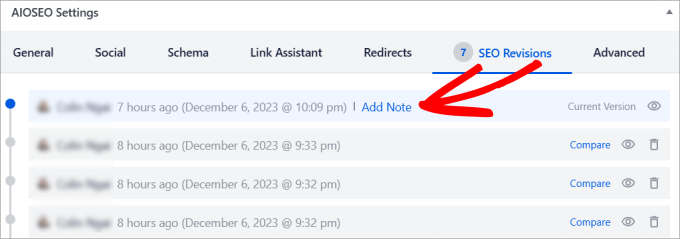
You can add explanatory notes to each SEO change, documenting how those adjustments affected content performance. This practice helps determine whether similar modifications should be applied to other content.
Simply hover over the relevant entry and select the note addition option. A text field will appear where you can record your observations.
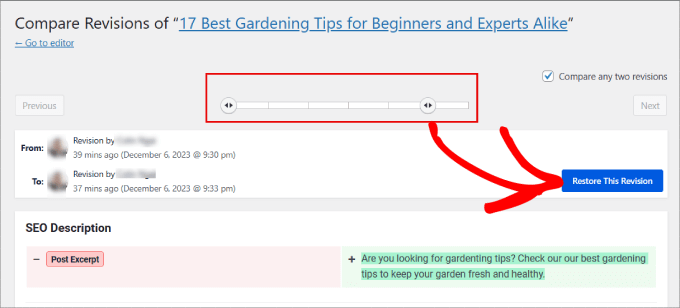
Selecting the view option displays specific modifications made during that revision. The comparison feature allows you to examine differences between two versions.
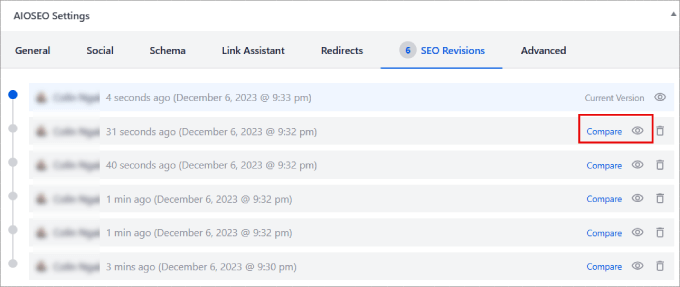
The comparison screen presents all SEO modifications relative to previous versions. This visualization helps assess whether changes contributed to improved search positioning.

Most revision systems include restoration functionality. If particular modifications prove ineffective, you can revert to earlier versions before those adjustments were implemented.
Tracking Search Engine Rankings
Beyond monitoring modifications, you need to determine whether those adjustments actually improve search positioning. Fortunately, many SEO tools include search statistics features to track key metrics and keyword rankings.
This data enables you to refine strategies and increase organic traffic to your content. Typically, you'll find these statistics in your SEO plugin's dashboard section within the WordPress administration area.
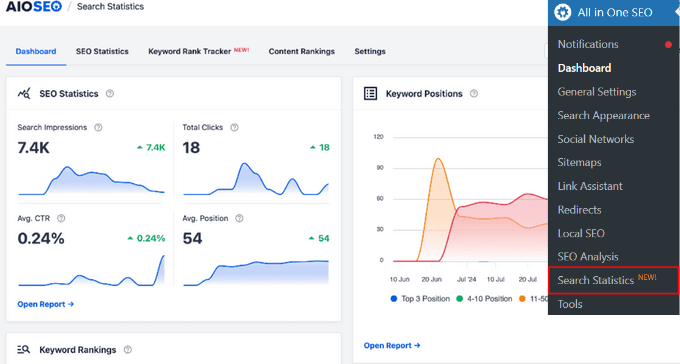
The dashboard typically displays essential SEO metrics including search impressions, total clicks, average click-through rates, and average position. It also shows the number of keywords your site ranks for across different positions.
Scrolling further reveals content performance sections highlighting best-performing pages, content experiencing ranking declines, and material improving in search positioning within selected timeframes.


