A Step-by-Step Guide to Creating a Wedding Website Using WordPress
By Editorial Team |
When we first started developing wedding websites, we invested significant time determining the optimal methodology, evaluating various themes, and identifying the ideal plugin combinations.
Fortunately, constructing your personal wedding website can be straightforward and economical. WordPress enables you to create an impressive site that manages all aspects, from narrating your relationship journey to handling guest confirmations. Most importantly, you can accomplish this independently without any programming expertise.
This comprehensive tutorial will guide you through the precise procedures we employ to develop wedding websites that are both visually appealing and simplify wedding coordination.
Whether you possess technical proficiency or are new to WordPress, we'll demonstrate how to design a wedding website that will delight your guests.
Why Should You Use WordPress for Your Wedding Website?
Planning your special day generates excitement, but managing numerous details while keeping everyone informed can become challenging. This complexity increases proportionally with your guest list size.
A wedding website serves as a centralized information portal where guests can access all necessary details—from fundamental information like date and venue to parking instructions, timelines, and directional maps.
Imagine eliminating frantic phone calls and last-minute inquiries from confused attendees.

Additionally, your website can perform essential functions: guests can submit attendance confirmations, select meal preferences, contribute messages to a digital guestbook, and more. Following the celebration, your wedding website becomes the perfect platform for sharing photographs with attendees.
You might question why more couples don't utilize wedding websites given their time-saving and stress-reducing benefits.

Many instructional resources complicate the process unnecessarily. They employ confusing terminology and emphasize costly solutions, leaving couples feeling overwhelmed and inclined to continue with traditional, more stressful methods.
However, the process can be simplified. Our approach focuses on making wedding website creation accessible for all couples. This guide will demonstrate how to develop a website that is:
- Beginner-Friendly: No technical experience required. We'll present information through straightforward, sequential instructions. Progress from Step 1 through subsequent steps to establish an attractively designed wedding website efficiently.
- Quick to Implement: We'll emphasize tools that install and manage rapidly, enabling swift website deployment so you can return to enjoyable planning activities.
- Cost-Effective: Recognizing wedding expenses, we'll provide strategies to minimize costs.
- Low-Maintenance: We'll recommend intuitive platforms that require minimal ongoing management, allowing you to focus on wedding preparations rather than technical adjustments.
Now, let's examine the wedding website creation process:
- Step 1: Select Your Wedding Website Platform
- Step 2: Configure Your Website Hosting
- Step 3: Install WordPress on Your Hosting Account
- Step 4: Choose a WordPress Theme
- Step 5: Design a Custom Home Page
- Step 6: Incorporate Membership Features
- Step 7: Create Additional Pages
- Step 8: Integrate a Google Map
- Step 9: Implement an RSVP Form
- Step 10: Add an Event Schedule
- Step 11: Include a Countdown Timer
- Step 12: Develop a Wedding Website Navigation Menu
- Step 13: Distribute Your Wedding Website Address
- Step 14: Upload Your Wedding Photographs
- Additional Recommendations: Creating Wedding Websites for Clients
Step 1: Select Your Wedding Website Platform
Your initial decision involves choosing the appropriate development tool. Given the numerous wedding-related choices you're managing, we'll simplify this selection: we recommend WordPress.
While multiple website builders exist, WordPress distinguishes itself for users seeking intuitive, dependable, and economical solutions.
Considering budget constraints common to wedding planning, WordPress offers significant advantages as an open-source platform available at no cost, potentially freeing resources for other wedding expenses.
The "free" designation doesn't imply limited functionality. WordPress represents a robust system with a distinctive feature implementation approach particularly suitable for wedding websites.
WordPress enables installation of extensions called plugins—software components that augment website capabilities. The official repository contains over 59,000 complimentary plugins, including numerous options specifically designed for weddings such as event calendars, mapping tools, and guest management systems.
Regarding technical specifications: two WordPress variants exist, making correct selection important.
WordPress.com functions as a blog hosting service, while WordPress.org (self-hosted WordPress) provides complete control. For wedding websites, many experienced developers recommend WordPress.org for its comprehensive management capabilities.
Step 2: Configure Your Website Hosting
Before developing your wedding website, several foundational elements require establishment.
First, select a domain name reflecting your unique relationship. This serves as your online address where guests access information about your celebration.
You'll also need web hosting services, which provide online storage for your website. Given wedding planning demands, we suggest choosing hosting providers offering reliable performance and excellent customer assistance, reducing technical concerns and increasing confidence.
To simplify this process, many WordPress experts have identified optimal hosting solutions for wedding websites.
Domain names typically cost approximately $14.99 annually, while hosting services generally start around $7.99 monthly. These expenses can accumulate, particularly when budgeting for other wedding elements.
Numerous hosting providers offer introductory rates for new customers. Research available options to identify services matching your requirements and budget constraints.
After selecting a provider, visit their website and locate the registration section.
This directs you to pricing information where you can evaluate hosting plans.
The basic hosting tier typically includes all necessary features for creating an attractive wedding website.

To proceed with a plan, select the appropriate option.
Next, choose a domain name for your wedding website.
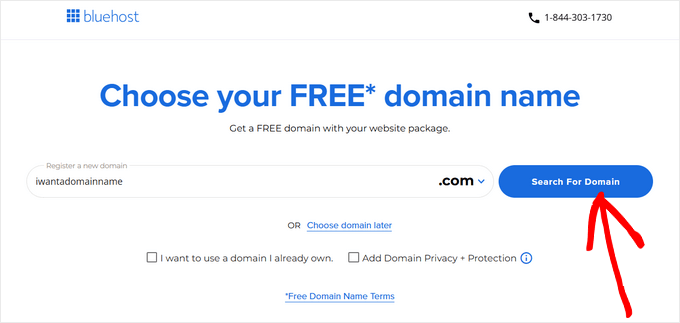
An effective domain name helps guests locate your site without difficulty. Ideal domain names are pronounceable, spellable, memorable, and relevant to your wedding. Consider incorporating personal elements like names or venue references for distinctiveness.
After determining your domain name, proceed with the registration process.
You'll then advance to the checkout page where the hosting provider requests account details including name and email address.



