
Building an eLearning Platform with WordPress: A Comprehensive 8-Step Guide
By Education Technology Team |
When developing our own educational video platform, the primary challenge wasn't producing instructional materials. The real obstacle was identifying a system capable of delivering lessons, managing student enrollment, and handling registrations without introducing unnecessary complexity.
Here's our perspective: most educators don't struggle because online teaching is inherently difficult—they encounter barriers because the technical implementation appears daunting.
The encouraging development is that constructing an eLearning website no longer demands extensive custom development cycles or costly proprietary platforms.
Using WordPress with appropriate membership plugins, you can establish a professional course platform within hours. This detailed guide demonstrates how to create an eLearning website with WordPress—polished, intuitive, and designed for scalability.
Why Build an eLearning Website?
Establishing an eLearning website creates numerous opportunities to disseminate knowledge, expand your audience reach, and generate online revenue.
Whether you're an instructor, entrepreneur, or digital creator, an online learning platform enables connections with students globally.
This approach represents a cost-efficient method for providing valuable educational resources. Rather than leasing physical classroom space or producing printed materials, you can develop online courses accessible around the clock.
Additionally, you maintain complete authority over your learning hub's design, branding, and content, making it straightforward to build a website that aligns with your educational vision.
- How to Create an eLearning Website
- Step 0: Choose a Domain Name and Web Hosting
- Step 1: Install WordPress and Pick an eLearning-Friendly Theme
- Step 2: Build Your eLearning Homepage
- Step 3: Set Up a Learning Management System
- Step 4: Create Your First Online Course Content
- Step 5: Restrict Access to Your Course Content
- Step 6: Add a Contact Form for Students
- Final Step: Set Up and Customize Your Navigation Menu
How to Create an eLearning Website
You might consider offering courses through third-party platforms, but many WordPress experts recommend using WordPress instead.
WordPress is a widely-used website creation platform that simplifies establishing your own eLearning environment. It provides complete control over revenue streams and content ownership.
Furthermore, with its adaptable learning management system plugins and education-focused themes, WordPress facilitates the creation of professional websites that serve both instructors and learners effectively.

Technical expertise isn't required to utilize WordPress. The platform provides comprehensive tools for website construction without coding knowledge.
Note that when referencing WordPress, we're discussing WordPress.org. This open-source platform grants full website control, allowing unlimited customization and feature expansion.
Step 0: Choose a Domain Name and Web Hosting
Before proceeding, let's briefly review the requirements for establishing your WordPress eLearning site.
Setting up a WordPress website requires two essential components: a domain name and web hosting.
Your domain name represents your website's internet address, while web hosting provides the server infrastructure that makes your site accessible to visitors.
Since you're building an educational platform, your hosting solution should accommodate features like secure authentication, payment processing, live sessions, and increasing student enrollment.
Numerous WordPress hosting providers offer suitable solutions for educational websites.
While WordPress software is free, domain registration typically costs approximately $15 annually. Web hosting services generally begin around $8 monthly.
Many experienced developers recommend selecting hosting providers that include complimentary domain registration and SSL certificates with their plans.
The SSL certificate enhances site security by encrypting data exchanged between your website and visitors, including login credentials and payment information.
After selecting a hosting plan, most providers offer setup wizards that guide you through domain selection, account creation, and additional service options.
Step 1: Install WordPress and Pick an eLearning-Friendly Theme
The initial phase involves WordPress installation to establish your eLearning website foundation. This process is typically automated, though specific procedures vary by hosting provider.
For instance, after purchasing hosting services, you'll typically access a control panel where WordPress is automatically installed on your domain.
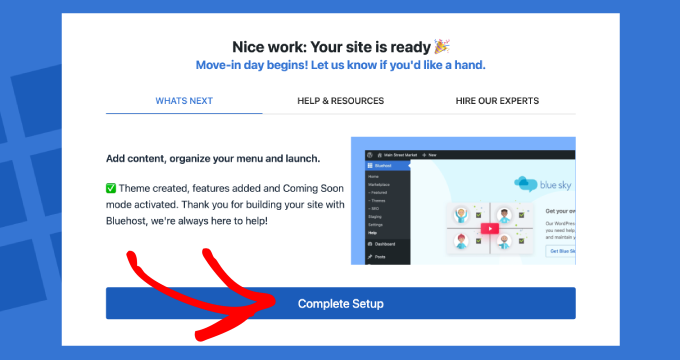
With WordPress operational, you can proceed to install a suitable WordPress theme.
WordPress themes control your site's visual presentation and layout. Your eLearning platform requires a theme that combines aesthetic appeal with functionality supporting courses, lessons, and student interaction.
Here are approaches to identifying the ideal theme for your educational website.
Explore the WordPress Theme Directory
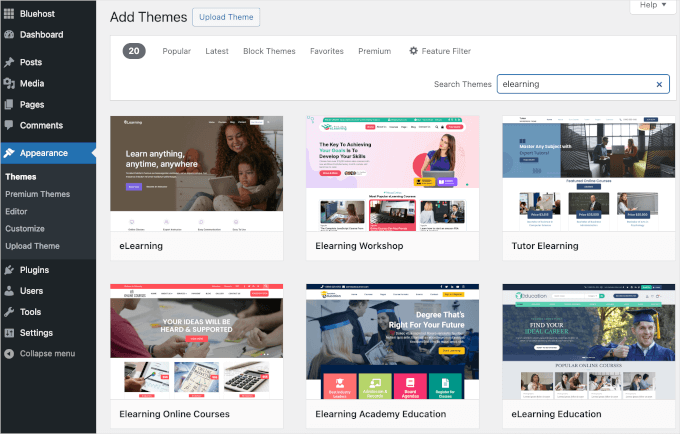
The WordPress theme directory serves as an excellent starting point for budget-conscious developers. It contains numerous free themes that install directly from your administrative dashboard.
Navigate to Appearance, then Themes, and select Add New. Utilize the search functionality to locate designs specifically tailored for educational websites.
Check Out Premium Theme Marketplaces
For advanced functionality and distinctive designs, premium theme marketplaces provide extensive options.
These commercial themes typically include enhanced customization capabilities, professional support services, and pre-designed layouts specifically developed for eLearning applications.
Use SeedProd for Total Customization
For maximum design flexibility when creating web pages, consider utilizing page builder plugins.
These drag-and-drop website builders enable designing sites from foundational elements or using pre-built templates. You can customize all aspects, from typography to layout structures, without programming knowledge.
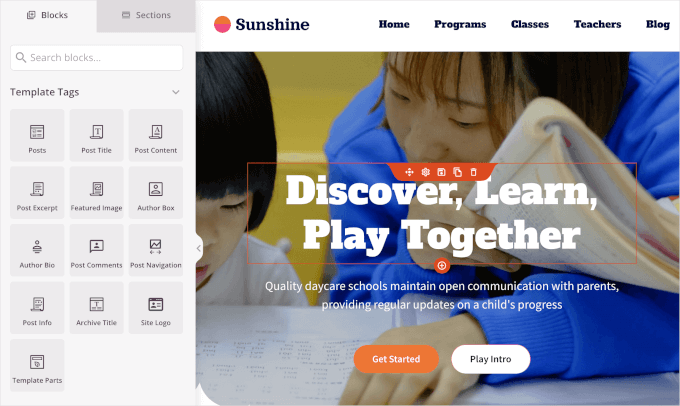
These page builders integrate seamlessly with WordPress, simplifying the addition of features like course registration systems and payment forms. Some include AI-powered website generation capabilities that can create complete websites rapidly.

Additional features may include AI-assisted content creation, translation tools, and image generation capabilities.
Each option presents distinct advantages. Free themes facilitate rapid deployment, premium themes offer refined designs, and page builders enable truly unique website creation.
After selecting an appropriate eLearning theme, proceed with WordPress theme installation procedures.


